

Organization session policy
Override application-level session timeouts for specific organizations with custom absolute and idle session policies
By default, all organizations inherit the session policy configured at the application level — covering absolute session duration and idle timeout. When an enterprise customer requires stricter or different session controls than your application defaults, you can set a custom session policy on a per-organization basis.
Scalekit always enforces the stricter of the two (application vs. organization) at session creation time, so organization policies can only tighten — not relax — your application-level defaults.
How it works
Section titled “How it works”Each organization can either inherit the application session policy or define its own. The two settings you can customize per organization are:
| Setting | Behavior |
|---|---|
| Absolute session timeout | Maximum session lifetime regardless of activity. Scalekit applies min(app value, org value). |
| Idle session timeout | Inactivity period after which the session expires. Enabled if either the app or org has it on; duration is min(app value, org value). |
Access token lifetime is not configurable at the org level. It remains an application-level setting only.
Set up custom session policy for an organization
Section titled “Set up custom session policy for an organization”Prerequisites
Section titled “Prerequisites”Enable the Session Policy feature for an organization before configuring a custom policy. Navigate to Dashboard > Organizations > [Organization] > Overview > Edit and turn on Session Policy feature. You can also use the organization settings API.
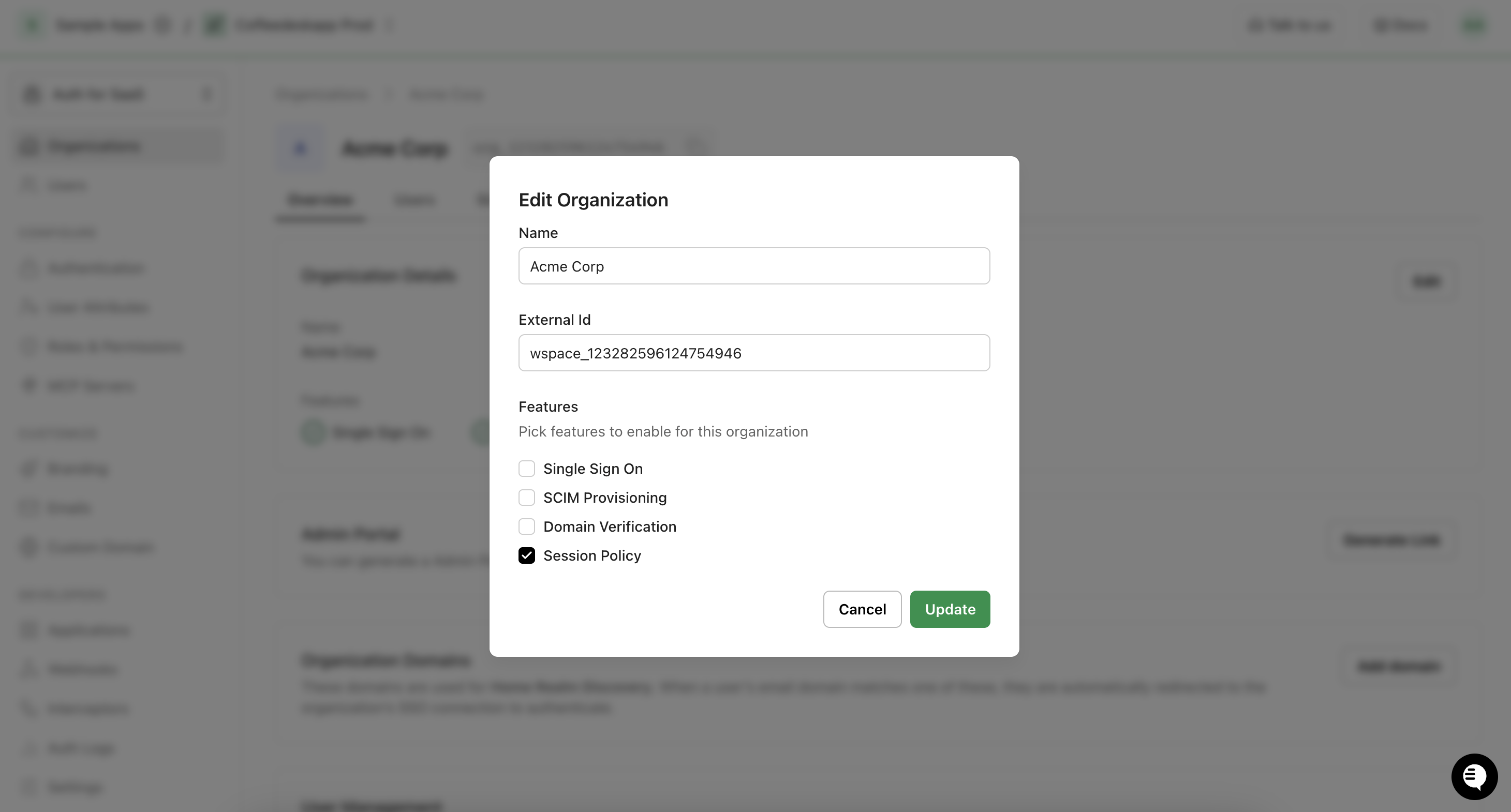
Configure via dashboard
Section titled “Configure via dashboard”Once the Session Policy feature is enabled for the organization, you can configure a custom policy for the organization via the Scalekit dashboard.
- Go to Dashboard > Organizations and open the organization.
- Click the Session Policy tab.
- Select Custom to apply org-specific settings, or Application to revert to defaults.
- Set the Absolute session timeout and Idle session timeout for the organization.
- Click Save.
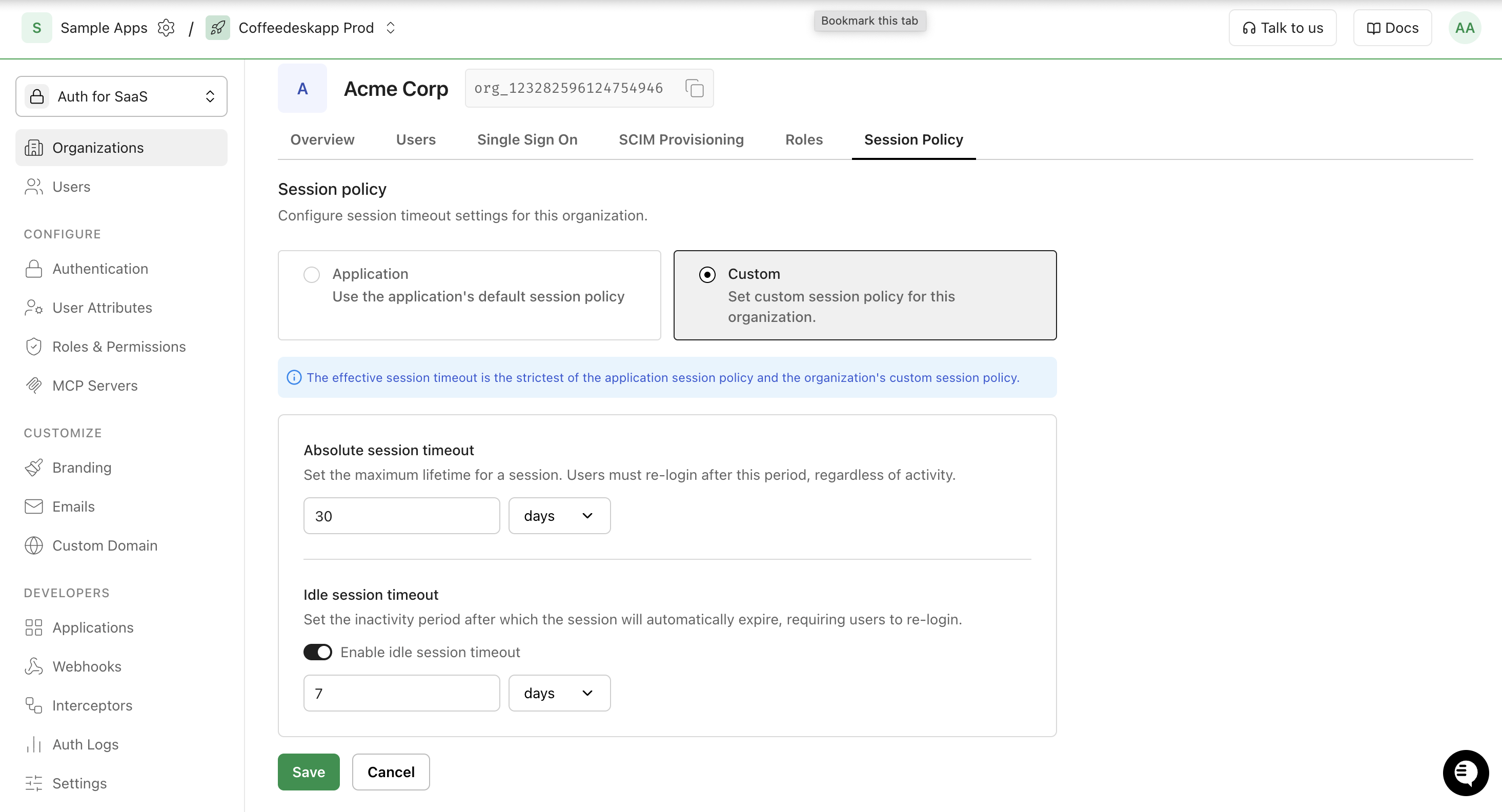
Let org admins self-serve via Hosted Widgets
Section titled “Let org admins self-serve via Hosted Widgets”You can let your customers manage their own session policy through Hosted Widgets — an embeddable self-service portal that lets your customers manage organization and user-level settings. When the Session Policy feature is enabled for an organization, the Session Policy widget becomes available in the Hosted Widget portal.
Configure via API/SDK
Section titled “Configure via API/SDK”-
Get the current session policy
Retrieve the active session policy for an organization to display it in your settings UI or audit the current configuration.
Get session policy try {const policy = await scalekit.organization.getOrganizationSessionPolicy('org_12345');// policySource: 1 = APPLICATION (inheriting defaults), 2 = CUSTOM (org-specific values active)console.log('Policy source:', policy.policySource);console.log('Absolute timeout (minutes):', policy.absoluteSessionTimeout);console.log('Idle timeout enabled:', policy.idleSessionTimeoutEnabled);} catch (error) {console.error('Failed to get session policy:', error.message);}Get session policy from scalekit.v1.organizations.organizations_pb2 import SessionPolicyTypetry:response, _ = scalekit_client.organization.get_organization_session_policy('org_12345')policy = response.policyif policy.policy_source == SessionPolicyType.CUSTOM:print('Absolute timeout (minutes):', policy.absolute_session_timeout.value)print('Idle timeout enabled:', policy.idle_session_timeout_enabled.value)except Exception as e:print('Failed to get session policy:', e)Get session policy policy, err := scalekitClient.Organization().GetOrganizationSessionPolicy(ctx, "org_12345")if err != nil {log.Fatal(err)}if policy.PolicySource == scalekit.SessionPolicySourceCustom {fmt.Println("Absolute timeout (minutes):", policy.AbsoluteSessionTimeout.GetValue())fmt.Println("Idle timeout enabled:", policy.IdleSessionTimeoutEnabled.GetValue())}Get session policy import com.scalekit.grpc.scalekit.v1.organizations.OrganizationSessionPolicySettings;import com.scalekit.grpc.scalekit.v1.organizations.SessionPolicyType;try {OrganizationSessionPolicySettings policy =scalekitClient.organizations().getOrganizationSessionPolicy("org_12345");if (policy.getPolicySource() == SessionPolicyType.CUSTOM) {System.out.println("Absolute timeout (minutes): " + policy.getAbsoluteSessionTimeout().getValue());System.out.println("Idle timeout enabled: " + policy.getIdleSessionTimeoutEnabled().getValue());}} catch (Exception e) {System.err.println("Failed to get session policy: " + e.getMessage());} -
Set a custom session policy
Apply a custom policy when an organization requires different session durations than your application defaults.
Set custom session policy try {const updated = await scalekit.organization.updateOrganizationSessionPolicy('org_12345', {policySource: 'CUSTOM',absoluteSessionTimeout: 480,absoluteSessionTimeoutUnit: 'MINUTES',idleSessionTimeoutEnabled: true,idleSessionTimeout: 60,idleSessionTimeoutUnit: 'MINUTES',});console.log('Policy updated:', updated.policySource);} catch (error) {console.error('Failed to update session policy:', error.message);}Set custom session policy from scalekit.v1.organizations.organizations_pb2 import SessionPolicyTypefrom scalekit.v1.commons.commons_pb2 import TimeUnittry:response, _ = scalekit_client.organization.update_organization_session_policy(organization_id='org_12345',policy_source=SessionPolicyType.CUSTOM,absolute_session_timeout=480,absolute_session_timeout_unit=TimeUnit.MINUTES,idle_session_timeout_enabled=True,idle_session_timeout=60,idle_session_timeout_unit=TimeUnit.MINUTES,)print('Policy updated:', response.policy.policy_source)except Exception as e:print('Failed to update session policy:', e)Set custom session policy timeout := int32(480)idleTimeout := int32(60)idleEnabled := trueupdated, err := scalekitClient.Organization().UpdateOrganizationSessionPolicy(ctx, "org_12345", scalekit.OrganizationSessionPolicy{PolicySource: scalekit.SessionPolicySourceCustom,AbsoluteSessionTimeout: &timeout,AbsoluteSessionTimeoutUnit: scalekit.TimeUnitMinutes,IdleSessionTimeoutEnabled: &idleEnabled,IdleSessionTimeout: &idleTimeout,IdleSessionTimeoutUnit: scalekit.TimeUnitMinutes,})if err != nil {log.Fatal(err)}fmt.Println("Policy updated:", updated.PolicySource)Set custom session policy import com.google.protobuf.Int32Value;import com.google.protobuf.BoolValue;import com.scalekit.grpc.scalekit.v1.commons.TimeUnit;import com.scalekit.grpc.scalekit.v1.organizations.OrganizationSessionPolicySettings;import com.scalekit.grpc.scalekit.v1.organizations.SessionPolicyType;try {OrganizationSessionPolicySettings policy = OrganizationSessionPolicySettings.newBuilder().setPolicySource(SessionPolicyType.CUSTOM).setAbsoluteSessionTimeout(Int32Value.of(480)).setAbsoluteSessionTimeoutUnit(TimeUnit.MINUTES).setIdleSessionTimeoutEnabled(BoolValue.of(true)).setIdleSessionTimeout(Int32Value.of(60)).setIdleSessionTimeoutUnit(TimeUnit.MINUTES).build();OrganizationSessionPolicySettings updated =scalekitClient.organizations().updateOrganizationSessionPolicy("org_12345", policy);System.out.println("Policy updated: " + updated.getPolicySource());} catch (Exception e) {System.err.println("Failed to update session policy: " + e.getMessage());} -
Revert to application defaults
Remove the custom policy and restore the organization to the application-level session settings.
Revert to application defaults try {await scalekit.organization.updateOrganizationSessionPolicy('org_12345', {policySource: 'APPLICATION',});} catch (error) {console.error('Failed to revert session policy:', error.message);}Revert to application defaults from scalekit.v1.organizations.organizations_pb2 import SessionPolicyTypetry:scalekit_client.organization.update_organization_session_policy(organization_id='org_12345',policy_source=SessionPolicyType.APPLICATION,)except Exception as e:print('Failed to revert session policy:', e)Revert to application defaults _, err := scalekitClient.Organization().UpdateOrganizationSessionPolicy(ctx, "org_12345", scalekit.OrganizationSessionPolicy{PolicySource: scalekit.SessionPolicySourceApplication,})if err != nil {log.Fatal(err)}Revert to application defaults import com.scalekit.grpc.scalekit.v1.organizations.OrganizationSessionPolicySettings;import com.scalekit.grpc.scalekit.v1.organizations.SessionPolicyType;try {OrganizationSessionPolicySettings policy = OrganizationSessionPolicySettings.newBuilder().setPolicySource(SessionPolicyType.APPLICATION).build();scalekitClient.organizations().updateOrganizationSessionPolicy("org_12345", policy);} catch (Exception e) {System.err.println("Failed to revert session policy: " + e.getMessage());}