


Apollo
scalekit75 toolsOAuth 2.0CRM & SalesConnect to Apollo.io to search and enrich B2B contacts and accounts, manage CRM contacts, and automate outreach sequences.
Apollo connector
-
Install the SDK
Section titled “Install the SDK”Terminal window npm install @scalekit-sdk/nodeTerminal window pip install scalekit -
Set your credentials
Section titled “Set your credentials”Add your Scalekit credentials to your
.envfile. Find values in app.scalekit.com > Developers > API Credentials..env SCALEKIT_ENVIRONMENT_URL=<your-environment-url>SCALEKIT_CLIENT_ID=<your-client-id>SCALEKIT_CLIENT_SECRET=<your-client-secret> -
Set up the connector
Section titled “Set up the connector”Register your Apollo credentials with Scalekit so it handles the token lifecycle. You do this once per environment.
Dashboard setup steps
Register your Scalekit environment with the Apollo connector so Scalekit handles the authentication flow and token lifecycle for you. The connection name you create will be used to identify and invoke the connection programmatically.
-
Create a connection in Scalekit
-
In Scalekit dashboard, go to AgentKit > Connections > Create Connection. Find Apollo and click Create.
-
Click Use your own credentials and copy the Redirect URI. It looks like:
https://<SCALEKIT_ENVIRONMENT_URL>/sso/v1/oauth/<CONNECTION_ID>/callbackScope Required for contact_readReading contact details contact_writeCreating contacts contact_updateUpdating contacts account_readReading account details account_writeCreating accounts organizations_enrichEnriching accounts with Apollo data person_readEnriching contacts (paid plans only) emailer_campaigns_searchListing email sequences accounts_searchSearching accounts (paid plans only) contacts_searchSearching contacts (paid plans only)
Keep this tab open — you’ll return to it in step 3.
-
-
Register an OAuth application in Apollo
-
Go to Apollo’s OAuth registration page and sign in with your Apollo account.
-
Fill in the registration form:
- Application name — a name to identify your app (e.g.,
My Sales Agent) - Description — brief description of what your app does
- Redirect URIs — paste the redirect URI you copied from Scalekit
- Application name — a name to identify your app (e.g.,
-
Under Scopes, select the permissions your agent needs. Use the table below to decide:
Scope Required for contact_readReading contact details contact_writeCreating contacts contact_updateUpdating contacts account_readReading account details account_writeCreating accounts organizations_enrichEnriching accounts with Apollo data person_readEnriching contacts (paid plans only) emailer_campaigns_searchListing email sequences accounts_searchSearching accounts (paid plans only) contacts_searchSearching contacts (paid plans only) 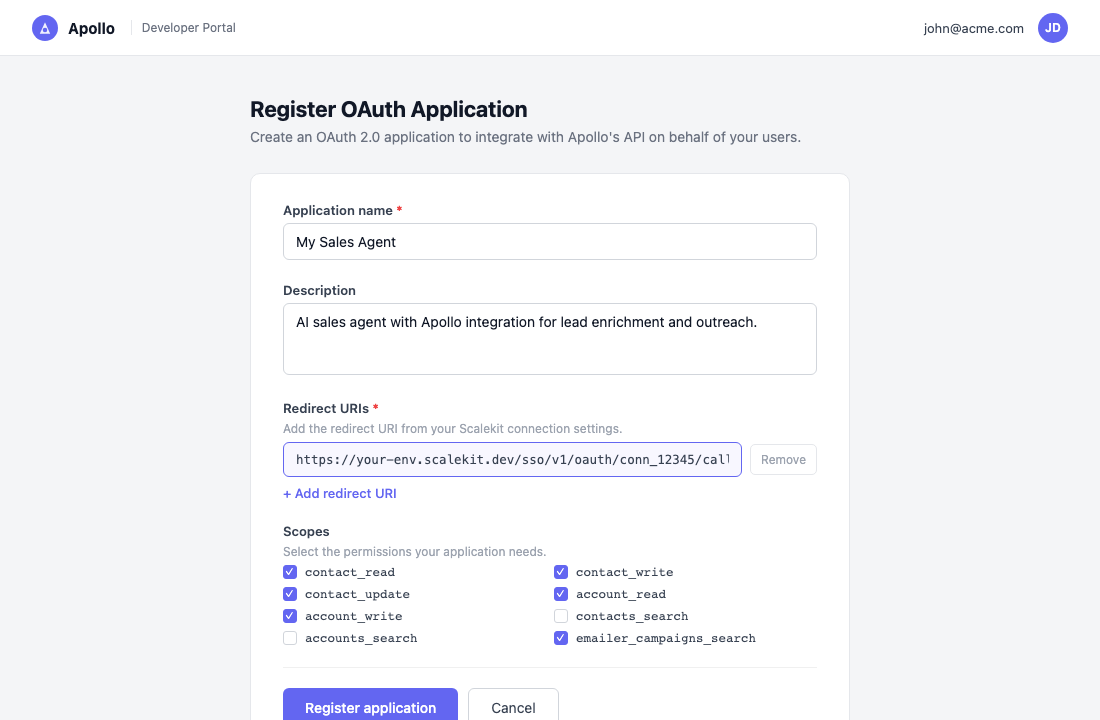
-
Click Register application.
-
-
Copy your client credentials
After registering, Apollo shows the Client ID and Client Secret for your application.
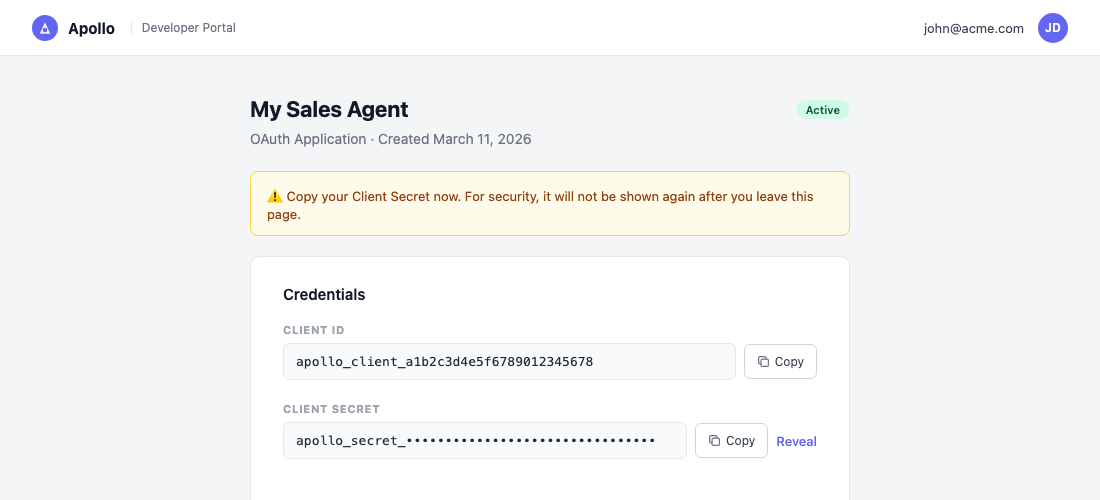
Copy both values now. The Client Secret is shown only once — you cannot retrieve it again after navigating away.
-
Add credentials in Scalekit
-
Return to Scalekit dashboard → AgentKit > Connections and open the connection you created in step 1.
-
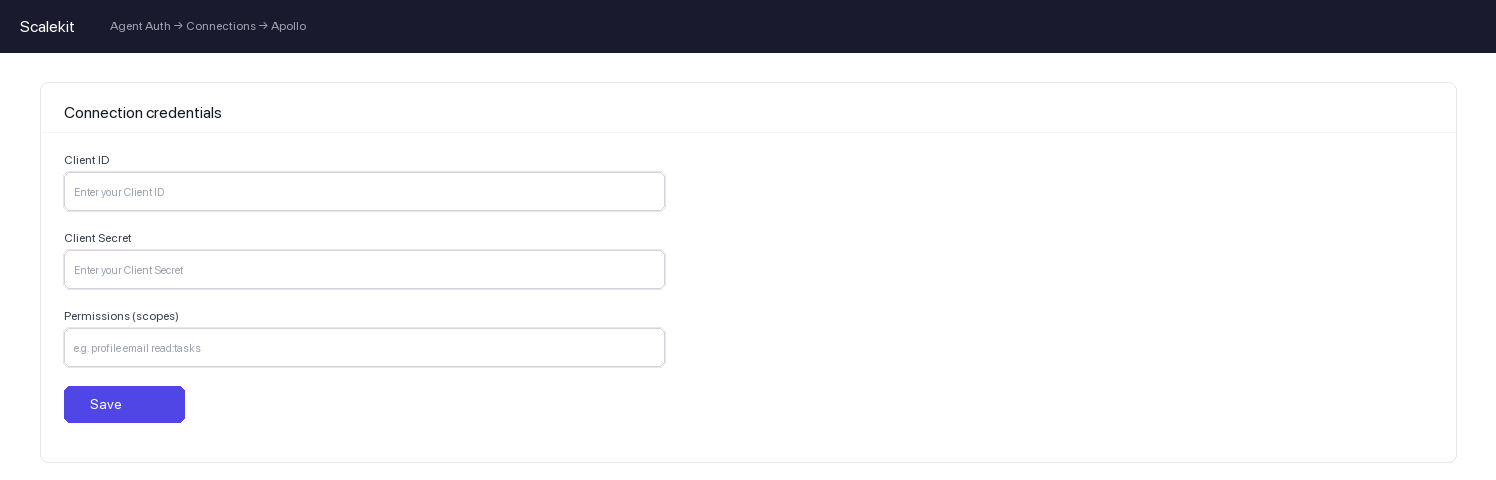
Enter the following:
- Client ID — from Apollo
- Client Secret — from Apollo
- Permissions — the same scopes you selected in Apollo
-
Click Save.
-
-
-
Authorize and make your first call
Section titled “Authorize and make your first call”quickstart.ts import { ScalekitClient } from '@scalekit-sdk/node'import 'dotenv/config'const scalekit = new ScalekitClient(process.env.SCALEKIT_ENV_URL,process.env.SCALEKIT_CLIENT_ID,process.env.SCALEKIT_CLIENT_SECRET,)const actions = scalekit.actionsconst connector = 'apollo'const identifier = 'user_123'// Generate an authorization link for the userconst { link } = await actions.getAuthorizationLink({ connectionName: connector, identifier })console.log('Authorize Apollo:', link)process.stdout.write('Press Enter after authorizing...')await new Promise(r => process.stdin.once('data', r))// Make your first callconst result = await actions.executeTool({connector,identifier,toolName: 'apollo_get_api_usage',toolInput: {},})console.log(result)quickstart.py import osfrom scalekit.client import ScalekitClientfrom dotenv import load_dotenvload_dotenv()scalekit_client = ScalekitClient(env_url=os.getenv("SCALEKIT_ENV_URL"),client_id=os.getenv("SCALEKIT_CLIENT_ID"),client_secret=os.getenv("SCALEKIT_CLIENT_SECRET"),)actions = scalekit_client.actionsconnection_name = "apollo"identifier = "user_123"# Generate an authorization link for the userlink_response = actions.get_authorization_link(connection_name=connection_name,identifier=identifier,)print("Authorize Apollo:", link_response.link)input("Press Enter after authorizing...")# Make your first callresult = actions.execute_tool(tool_input={},tool_name="apollo_get_api_usage",connection_name=connection_name,identifier=identifier,)print(result)
What you can do
Section titled “What you can do”Connect this agent connector to let your agent:
- Update custom field, task, sequence contact status — Update an existing custom field on contacts, accounts, or deals (opportunities) in your Apollo account
- Get webhook result, email content, credit usage — Retrieve the result of an asynchronous People Enrichment or Bulk People Enrichment request by its request_id, without waiting for Apollo’s webhook callback
- Task skip, complete — Mark an existing task in your team’s Apollo account as skipped, without completing it, by task ID
- Send email — Immediately send an existing Apollo email message that is in a drafted, scheduled, or failed state
- Search tasks, people, news articles — Find tasks that your team has created in Apollo, with sorting and pagination
- List remove records from, users, lists — Remove contacts or accounts from one or more Apollo lists, referencing the lists by name
Common workflows
Section titled “Common workflows”Proxy API call
const result = await actions.request({ connectionName: 'apollo', identifier: 'user_123', path: '/api/v1/contacts/search', method: 'POST',});console.log(result.data);result = actions.request( connection_name='apollo', identifier='user_123', path="/api/v1/contacts/search", method="POST",)print(result)Execute a tool
const result = await actions.executeTool({ connector: 'apollo', identifier: 'user_123', toolName: 'apollo_create_account', toolInput: {},});console.log(result);result = actions.execute_tool( connection_name='apollo', identifier='user_123', tool_name='apollo_create_account', tool_input={},)print(result)Tool list
Section titled “Tool list”Use the exact tool names from the Tool list below when you call execute_tool. If you’re not sure which name to use, list the tools available for the current user first.
apollo_activate_sequence#Activate (start) an inactive Sequence in your team's Apollo account by ID. Once activated, the sequence begins sending emails to its contacts on the configured schedule. The sequence must have at least one step configured before it can be activated. Requires a master API key. Returns the updated sequence object with its active state.1 param
Activate (start) an inactive Sequence in your team's Apollo account by ID. Once activated, the sequence begins sending emails to its contacts on the configured schedule. The sequence must have at least one step configured before it can be activated. Requires a master API key. Returns the updated sequence object with its active state.
sequence_idstringrequiredThe Apollo ID for the sequence that you want to activate. To find sequence IDs, use the Search for Sequences endpoint and identify the id value for the sequence.apollo_add_contacts_to_sequence#Add contacts to an existing Sequence in your team's Apollo account, identified either by contact_ids or by label_names (at least one is required). Requires a sending email account (send_email_from_email_account_id). Supports overrides to allow adding contacts despite missing/unverified emails, recent job changes, membership in other sequences, or ownership restrictions. Requires a master API key. Returns the count and status of contacts added.17 params
Add contacts to an existing Sequence in your team's Apollo account, identified either by contact_ids or by label_names (at least one is required). Requires a sending email account (send_email_from_email_account_id). Supports overrides to allow adding contacts despite missing/unverified emails, recent job changes, membership in other sequences, or ownership restrictions. Requires a master API key. Returns the count and status of contacts added.
send_email_from_email_account_idstringrequiredThe Apollo ID for the email account used to send to contacts you add to the sequence. Use Get a List of Email Accounts to find the ID. A single ID is typical; Apollo also accepts a JSON array of IDs for multi-mailbox rotation.sequence_idstringrequiredThe Apollo ID for the sequence to which you want to add contacts. To find sequence IDs, use the Search for Sequences endpoint and identify the id value for the sequence.add_if_in_queuebooleanoptionalSet to true to add contacts even if they are currently in the queue for processing.auto_unpause_atstringoptionalDateTime when paused contacts should be automatically unpaused. Must be used with status=paused. Format: ISO 8601 datetime string.contact_idsarrayoptionalThe Apollo IDs for the contacts to add to the sequence. Use Search Contacts to find contact IDs. Either contact_ids or label_names must be provided.contact_verification_skippedbooleanoptionalSet to true to skip contact verification during the addition process.contacts_without_ownership_permissionbooleanoptionalSet to true to add contacts even if you do not have ownership permission for them.label_namesarrayoptionalAlternative to contact_ids. Names of labels used to identify contacts to add to the sequence; all contacts carrying these labels are enrolled. Either contact_ids or label_names must be provided.send_email_from_email_addressstringoptionalOptional specific email address to send from within the email account.sequence_active_in_other_campaignsbooleanoptionalSet to true to add contacts even if they are already active in other sequences. Does not differentiate between active and paused sequences.sequence_finished_in_other_campaignsbooleanoptionalSet to true to add contacts even if they have been marked as finished in another sequence.sequence_job_changebooleanoptionalSet to true to add contacts to the sequence even if they have recently changed jobs.sequence_no_emailbooleanoptionalSet to true to add contacts to the sequence even if they do not have an email address.sequence_same_company_in_same_campaignbooleanoptionalSet to true to add contacts even if other contacts from the same company are already in the sequence.sequence_unverified_emailbooleanoptionalSet to true to add contacts to the sequence if they have an unverified email address.statusstringoptionalInitial status for added contacts. When set to paused along with auto_unpause_at, enables scheduled addition of contacts.user_idstringoptionalThe ID for the user in your team's Apollo account taking the action of adding contacts. Shown in the sequence's activity log. Use Get a List of Users to find IDs.apollo_add_records_to_list#Add existing contacts or accounts to one or more Apollo lists, referencing the lists by name. If a list name doesn't already exist for the given modality, Apollo creates it automatically. If no valid entity_ids or label_names are provided, no changes are made and a 200 confirmation is returned.4 params
Add existing contacts or accounts to one or more Apollo lists, referencing the lists by name. If a list name doesn't already exist for the given modality, Apollo creates it automatically. If no valid entity_ids or label_names are provided, no changes are made and a 200 confirmation is returned.
entity_idsarrayrequiredThe Apollo IDs of the contacts or accounts to add to the listslabel_namesarrayrequiredThe names of the lists to add the records tomodalitystringrequiredThe type of records referenced by entity_idsasyncbooleanoptionalWhether to process the request in the background instead of synchronouslyapollo_archive_sequence#Archive a Sequence in your team's Apollo account by ID. Archiving marks the sequence as inactive and finishes all contacts currently in it; this cannot be trivially undone through normal sequence controls. You must be the owner of the sequence or have full access sharing permissions to archive it. Requires a master API key. Returns the updated sequence object.1 param
Archive a Sequence in your team's Apollo account by ID. Archiving marks the sequence as inactive and finishes all contacts currently in it; this cannot be trivially undone through normal sequence controls. You must be the owner of the sequence or have full access sharing permissions to archive it. Requires a master API key. Returns the updated sequence object.
sequence_idstringrequiredThe Apollo ID for the sequence that you want to archive. To find sequence IDs, use the Search for Sequences endpoint and identify the id value for the sequence.apollo_bulk_create_accounts#Create up to 100 accounts (companies) in your Apollo CRM in a single request. Supports intelligent deduplication by CRM ID (and optionally by domain, organization ID, and name) — accounts that already exist are returned unmodified in a separate existing_accounts array rather than being updated. Use Bulk Update Accounts to modify existing accounts instead.3 params
Create up to 100 accounts (companies) in your Apollo CRM in a single request. Supports intelligent deduplication by CRM ID (and optionally by domain, organization ID, and name) — accounts that already exist are returned unmodified in a separate existing_accounts array rather than being updated. Use Bulk Update Accounts to modify existing accounts instead.
accountsarrayrequiredArray of account attribute objects to create (maximum 100 per request)append_label_namesarrayoptionalLabel names to attach to every account created in this requestrun_dedupebooleanoptionalEnable aggressive deduplication by domain, organization ID, and nameapollo_bulk_create_contacts#Create up to 100 contacts in your Apollo CRM in a single request. Supports intelligent deduplication and returns separate arrays for newly created and existing contacts. This endpoint only creates new contacts (except for placeholder contacts from email imports) — existing contacts that match are returned unmodified in existing_contacts. To update existing contacts, use Bulk Update Contacts instead.4 params
Create up to 100 contacts in your Apollo CRM in a single request. Supports intelligent deduplication and returns separate arrays for newly created and existing contacts. This endpoint only creates new contacts (except for placeholder contacts from email imports) — existing contacts that match are returned unmodified in existing_contacts. To update existing contacts, use Bulk Update Contacts instead.
contactsarrayrequiredArray of contact objects to create (maximum 100 per request). Each object may include fields such as first_name, last_name, email, title, primary_title, organization_name, phone, present_raw_address, linkedin_url, facebook_url, twitter_url, photo_url, account_id, organization_id, contact_stage_id, salesforce_id, hubspot_id, salesforce_lead_id, salesforce_contact_id, salesforce_account_id, outreach_id, salesloft_id, phone_status_cd, typed_custom_fields (object of field_id to value), contact_emails (array of {email, position}), phone_numbers (array of {raw_number, position}), and contact_role_type_ids (array of strings).append_label_namesarrayoptionalLabel names to add to every contact created in this requestowner_idstringoptionalApollo user ID to assign as owner of all contacts in this batchrun_dedupebooleanoptionalEnable full deduplication across all sources before creating contactsapollo_bulk_create_tasks#Create multiple tasks in a single request by supplying a list of contact IDs; a separate task is created for each contact using the same owner, type, due date, and other details. Returns a success boolean and the tasks array of created task objects. Apollo does not deduplicate tasks. Requires a master API key.7 params
Create multiple tasks in a single request by supplying a list of contact IDs; a separate task is created for each contact using the same owner, type, due date, and other details. Returns a success boolean and the tasks array of created task objects. Apollo does not deduplicate tasks. Requires a master API key.
contact_idsarrayrequiredThe Apollo IDs for the contacts on the receiving end of the actiondue_atstringrequiredThe full date and time when the tasks will be due, in ISO 8601 date-time formatstatusstringrequiredThe status of the tasks being createdtypestringrequiredThe task type, indicating what action the owner needs to take for each contactuser_idstringrequiredThe ID for the task owner within your team's Apollo accountnotestringoptionalA human-readable description providing context for the task owner, applied to every created taskprioritystringoptionalPriority to assign to the tasksapollo_bulk_enrich_organizations#Enrich data for up to 10 companies in a single API call, matching each by domain, LinkedIn URL, name, and/or website. Returns industry, revenue, employee counts, funding, and corporate contact details. Consumes 1 Apollo credit per organization matched; 0 credits if no match is found. Rate limited to 20/min, 100/hour, 600/day.2 params
Enrich data for up to 10 companies in a single API call, matching each by domain, LinkedIn URL, name, and/or website. Returns industry, revenue, employee counts, funding, and corporate contact details. Consumes 1 Apollo credit per organization matched; 0 credits if no match is found. Rate limited to 20/min, 100/hour, 600/day.
detailsarrayoptionalInfo for each company to enrich, one object per company (up to 10 companies per request)domainsarrayoptionalDomains of the companies to enrich, matched by domain onlyapollo_bulk_enrich_people#Enrich data for up to 10 people in a single API call by matching on name, email, employer, LinkedIn URL, or Apollo person ID. Optionally reveal personal emails and phone numbers (phone reveal requires a webhook_url; results are delivered asynchronously). Consumes 1-9 Apollo credits per person depending on what is matched; 0 credits if no match is found.6 params
Enrich data for up to 10 people in a single API call by matching on name, email, employer, LinkedIn URL, or Apollo person ID. Optionally reveal personal emails and phone numbers (phone reveal requires a webhook_url; results are delivered asynchronously). Consumes 1-9 Apollo credits per person depending on what is matched; 0 credits if no match is found.
detailsarrayrequiredInfo for each person to enrich, one object per person (up to 10 people per request)reveal_personal_emailsbooleanoptionalAttempt to reveal personal email addresses for all matched peoplereveal_phone_numberbooleanoptionalAttempt to reveal phone numbers, including mobile, for all matched peoplerun_waterfall_emailbooleanoptionalEnable waterfall enrichment for email using connected third-party data sourcesrun_waterfall_phonebooleanoptionalEnable waterfall enrichment for phone using connected third-party data sourceswebhook_urlstringoptionalHTTPS URL Apollo should deliver asynchronous phone or waterfall enrichment results toapollo_bulk_update_accounts#Update up to 1,000 accounts in your Apollo CRM in a single request. Provide either account_ids with shared field values (name, owner_id, account_stage_id) to apply identical updates to every account, or account_attributes with per-account objects to apply different updates to each account. Async processing is only supported with account_ids.6 params
Update up to 1,000 accounts in your Apollo CRM in a single request. Provide either account_ids with shared field values (name, owner_id, account_stage_id) to apply identical updates to every account, or account_attributes with per-account objects to apply different updates to each account. Async processing is only supported with account_ids.
account_attributesarrayoptionalArray of per-account update objects, each requiring an account id and any fields to changeaccount_idsarrayoptionalArray of account IDs to apply the same update values toaccount_stage_idstringoptionalAccount stage ID to apply to all accounts listed in account_idsasyncbooleanoptionalProcess the update asynchronouslynamestringoptionalAccount name to apply to all accounts listed in account_idsowner_idstringoptionalOwner user ID to apply to all accounts listed in account_idsapollo_bulk_update_contacts#Update multiple Apollo contacts in a single request. Provide either contact_ids (to apply the same field values to every listed contact) or contact_attributes (to apply different values per contact) — at least one is required. Up to 100 contacts are processed synchronously; 101-1000 are processed asynchronously (or force async at any size). Requests over 1000 contacts are rejected with a 422 error.14 params
Update multiple Apollo contacts in a single request. Provide either contact_ids (to apply the same field values to every listed contact) or contact_attributes (to apply different values per contact) — at least one is required. Up to 100 contacts are processed synchronously; 101-1000 are processed asynchronously (or force async at any size). Requests over 1000 contacts are rejected with a 422 error.
account_idstringoptionalAccount ID to apply to all contacts referenced by contact_idsasyncbooleanoptionalForce asynchronous processing regardless of batch sizecontact_attributesarrayoptionalArray of contact objects with per-contact updates. Each object must include an 'id' field plus any of: first_name, last_name, email, title, organization_name, owner_id, account_id, present_raw_address, linkedin_url, typed_custom_fields (object of field_id to value). Use this to apply different values to each contact in one request.contact_idsarrayoptionalArray of contact IDs to update with the same field valuesemailstringoptionalEmail address to apply to all contacts referenced by contact_idsfirst_namestringoptionalFirst name to apply to all contacts referenced by contact_idslast_namestringoptionalLast name to apply to all contacts referenced by contact_idslinkedin_urlstringoptionalLinkedIn URL to apply to all contacts referenced by contact_idsorganization_namestringoptionalOrganization name to apply to all contacts referenced by contact_idsowner_idstringoptionalOwner user ID to apply to all contacts referenced by contact_idspresent_raw_addressstringoptionalLocation/address to apply to all contacts referenced by contact_idstitlestringoptionalJob title to apply to all contacts referenced by contact_idstyped_custom_fieldsobjectoptionalCustom field values, keyed by field_id, to apply to all contacts referenced by contact_idsvisible_entity_idsarrayoptionalSpecific contact IDs to include in the response, for performance on large batchesapollo_complete_task#Mark an existing task in your team's Apollo account as completed by task ID. If the task no longer exists (for example, its sequence was paused and the task was removed), Apollo returns a 200 response with deleted: true on the task instead of an error. Use Skip Task instead if you want to mark the task done without completing it. Use Search Tasks to find task IDs.2 params
Mark an existing task in your team's Apollo account as completed by task ID. If the task no longer exists (for example, its sequence was paused and the task was removed), Apollo returns a 200 response with deleted: true on the task instead of an error. Use Skip Task instead if you want to mark the task done without completing it. Use Search Tasks to find task IDs.
task_idstringrequiredThe Apollo ID for the task to completenotestringoptionalAn optional note to record when completing the taskapollo_create_account#Create a new account (company) record in your Apollo CRM. Accounts represent organizations and can be linked to contacts. Check for duplicates before creating to avoid double entries.5 params
Create a new account (company) record in your Apollo CRM. Accounts represent organizations and can be linked to contacts. Check for duplicates before creating to avoid double entries.
namestringrequiredName of the company/accountdomainstringoptionalWebsite domain of the companylinkedin_urlstringoptionalLinkedIn company page URLphone_numberstringoptionalMain phone number of the companyraw_addressstringoptionalPhysical address of the companyapollo_create_contact#Create a new contact record in your Apollo CRM. The contact will appear in your Apollo contacts list and can be enrolled in sequences. Check for duplicates before creating to avoid double entries.8 params
Create a new contact record in your Apollo CRM. The contact will appear in your Apollo contacts list and can be enrolled in sequences. Check for duplicates before creating to avoid double entries.
first_namestringrequiredFirst name of the contactlast_namestringrequiredLast name of the contactaccount_idstringoptionalApollo account ID to associate this contact withemailstringoptionalEmail address of the contactlinkedin_urlstringoptionalLinkedIn profile URL of the contactorganization_namestringoptionalCompany name the contact works atphonestringoptionalPhone number of the contacttitlestringoptionalJob title of the contactapollo_create_custom_field#Create a new custom field on contacts, accounts, or deals (opportunities) in your Apollo account. Custom fields let your team capture unique details and can be used to personalize sequences. Returns the created field's ID and configuration.4 params
Create a new custom field on contacts, accounts, or deals (opportunities) in your Apollo account. Custom fields let your team capture unique details and can be used to personalize sequences. Returns the created field's ID and configuration.
labelstringrequiredName of the custom field to createmodalitystringrequiredThe record type this custom field applies totypestringrequiredData type of the custom fieldmeta_max_lengthintegeroptionalMaximum character length allowed for the field value (applies to string/textarea field types)apollo_create_deal#Create a new deal (sales opportunity) in your team's Apollo account. A deal can be linked to an existing Apollo account, assigned an owner, a monetary amount, and a deal stage. Returns the created deal object including its Apollo-assigned ID.7 params
Create a new deal (sales opportunity) in your team's Apollo account. A deal can be linked to an existing Apollo account, assigned an owner, a monetary amount, and a deal stage. Returns the created deal object including its Apollo-assigned ID.
namestringrequiredHuman-readable name for the dealaccount_idstringoptionalThe Apollo account (company) ID this deal is targetingamountstringoptionalThe monetary value of the deal, as a plain number string with no commas or currency symbolsclosed_datestringoptionalEstimated close date for the deal in YYYY-MM-DD formatopportunity_stage_idstringoptionalThe Apollo ID of the deal stage to set for this dealowner_idstringoptionalThe Apollo user ID of the deal ownertyped_custom_fieldsobjectoptionalCustom field values for the deal, keyed by custom field IDapollo_create_email_draft#Create a single, unsent email draft for an Apollo contact, or draft a reply within an existing email thread. The draft is created with a `drafted` status and is not sent — use Send Email Now with the returned `id` to send it. Returns the created emailer_message object (and a linked task object if applicable).9 params
Create a single, unsent email draft for an Apollo contact, or draft a reply within an existing email thread. The draft is created with a `drafted` status and is not sent — use Send Email Now with the returned `id` to send it. Returns the created emailer_message object (and a linked task object if applicable).
attachment_idsarrayoptionalApollo IDs of attachments to include with the emailbody_htmlstringoptionalThe body of the email as HTMLcontact_idstringoptionalThe Apollo ID of the contact who will receive the emailemailer_template_idstringoptionalThe Apollo ID of an email template to associate with the draftenable_trackingbooleanoptionalWhether to enable open and click tracking for the emailin_response_to_emailer_message_idstringoptionalThe Apollo ID of an existing email message this draft replies tooutreach_task_idstringoptionalThe Apollo ID of an outreach task to associate with the draftrecipientsarrayoptionalList of recipients for the email, used to set to/cc/bccsubjectstringoptionalThe subject line of the emailapollo_create_list#Create a new, empty contact or account list in your team's Apollo account. List names must be unique per modality within your team — creating a duplicate name for the same modality returns a 422 response. After creating a list, add records to it with Add Records to a List.3 params
Create a new, empty contact or account list in your team's Apollo account. List names must be unique per modality within your team — creating a duplicate name for the same modality returns a 422 response. After creating a list, add records to it with Add Records to a List.
modalitystringrequiredThe type of records the list holdsnamestringrequiredThe name for the new listbook_of_businessbooleanoptionalWhether to mark an account list as a Book of Business (BoB) listapollo_create_sequence#Create a new Sequence (emailer campaign) in your team's Apollo account, including its steps and email templates. Steps are provided via the emailer_steps array; each auto_email/manual_email step can include one or more emailer_touches. Set active to true to start sending immediately once contacts are added. Requires a master API key. Returns the created sequence object including its id.22 params
Create a new Sequence (emailer campaign) in your team's Apollo account, including its steps and email templates. Steps are provided via the emailer_steps array; each auto_email/manual_email step can include one or more emailer_touches. Set active to true to start sending immediately once contacts are added. Requires a master API key. Returns the created sequence object including its id.
namestringrequiredA human-readable name for the sequence. Example: Q3 Outbound OutreachactivebooleanoptionalSet to true to activate the sequence immediately after creation so contacts added to it start receiving steps. If omitted or false, the sequence is created in an inactive state.create_task_if_email_openbooleanoptionalSet to true to automatically create a task when a contact opens an email a certain number of times. Use email_open_trigger_task_threshold to set the number of opens.days_to_wait_before_mark_as_responseintegeroptionalThe number of days to wait before an incoming email is no longer treated as a response to the sequence.email_open_trigger_task_thresholdintegeroptionalThe number of email opens that triggers task creation when create_task_if_email_open is true.emailer_schedule_idstringoptionalThe Apollo ID for the sending schedule that controls the days and times emails are sent. The schedule must belong to your team and must not be empty. Use List Email Schedules to find an ID.emailer_stepsarrayoptionalThe steps to create in the sequence, in run order (the first item becomes the first step). Each step object supports: type (auto_email, manual_email, call, action_item, linkedin_step_connect, linkedin_step_message, linkedin_step_view_profile, linkedin_step_interact_post), wait_time (integer), wait_mode (minute/hour/day), exact_datetime (ISO 8601, required if sequence_by_exact_daytime is true), priority (high/medium/low), note, max_emails_per_day, auto_skip_in_x_days, and emailer_touches (array of {type: new_thread|reply_to_thread, status: approved|to_be_reviewed, include_signature, emailer_template: {id, subject, body_html}, attachment_ids}). A touch can only be approved if its template has a non-empty body.excluded_account_stage_idsarrayoptionalThe Apollo IDs for account stages to exclude from the sequence. All IDs must belong to your team.excluded_contact_stage_idsarrayoptionalThe Apollo IDs for contact stages to exclude from the sequence. All IDs must belong to your team.folder_idstringoptionalThe Apollo ID for the folder in which to place the sequence.ignore_apollo_global_email_bounce_listbooleanoptionalSet to true to send emails to contacts even if their email address is on Apollo's global bounce list.label_namesarrayoptionalNames of lists (labels) to apply to the sequence. Labels that do not exist yet are created. Example: ["Outbound", "Q3"]mark_finished_if_clickbooleanoptionalSet to true to mark contacts as finished in the sequence when they click a link in an email.mark_finished_if_interestedbooleanoptionalSet to true to mark contacts as finished in the sequence when they are marked as interested.mark_finished_if_replybooleanoptionalSet to true to mark contacts as finished in the sequence when they reply to an email.mark_paused_if_ooobooleanoptionalSet to true to pause contacts in the sequence when an out-of-office auto-reply is detected.max_emails_per_dayintegeroptionalThe maximum number of emails the sequence sends per day. Must not be negative.permissionsstringoptionalWho can use or view the sequence within your team. One of: team_can_use (all team members can use it, default), team_can_view (team members can view but not use it), private (only the owner can view and use it).same_account_reply_delay_daysintegeroptionalThe number of days to pause other contacts at the same account after a reply is received. The maximum value is 1000.sequence_by_exact_daytimebooleanoptionalSet to true to schedule every step at an exact date and time (exact_datetime becomes required on each step) instead of using relative wait intervals (wait_time/wait_mode).sequence_ruleset_idstringoptionalThe Apollo ID for an existing sequence ruleset to apply shared sequence settings.user_idstringoptionalThe Apollo user ID for the owner of the sequence. Defaults to the user that owns the API key.apollo_create_task#Create a single task in Apollo for a task owner to follow up on a contact, such as a call, email, or LinkedIn action. Returns the created task object. Apollo does not deduplicate tasks, so creating a task with the same owner/contact/details as an existing one creates a new task rather than updating it. Requires a master API key.8 params
Create a single task in Apollo for a task owner to follow up on a contact, such as a call, email, or LinkedIn action. Returns the created task object. Apollo does not deduplicate tasks, so creating a task with the same owner/contact/details as an existing one creates a new task rather than updating it. Requires a master API key.
contact_idstringrequiredThe Apollo ID for the contact on the receiving end of the actiondue_atstringrequiredThe full date and time when the task will be due, in ISO 8601 date-time formatstatusstringrequiredThe status of the task being createdtypestringrequiredThe task type, indicating what action the owner needs to takeuser_idstringrequiredThe ID for the task owner within your team's Apollo accountnotestringoptionalA human-readable description providing context for the task ownerprioritystringoptionalPriority to assign to the tasktitlestringoptionalA title for the taskapollo_deactivate_sequence#Deactivate (stop) an active Sequence in your team's Apollo account by ID. Once deactivated, the sequence pauses all contacts and stops sending emails, but the sequence and its contacts are preserved for later reactivation. Requires a master API key. Returns the updated sequence object with its active state.1 param
Deactivate (stop) an active Sequence in your team's Apollo account by ID. Once deactivated, the sequence pauses all contacts and stops sending emails, but the sequence and its contacts are preserved for later reactivation. Requires a master API key. Returns the updated sequence object with its active state.
sequence_idstringrequiredThe Apollo ID for the sequence that you want to deactivate. To find sequence IDs, use the Search for Sequences endpoint and identify the id value for the sequence.apollo_enrich_account#Enrich a company/account record with Apollo firmographic data using the company's website domain or name. Returns verified employee count, revenue estimates, industry, tech stack, funding rounds, and social profiles. Consumes Apollo credits per match.2 params
Enrich a company/account record with Apollo firmographic data using the company's website domain or name. Returns verified employee count, revenue estimates, industry, tech stack, funding rounds, and social profiles. Consumes Apollo credits per match.
domainstringoptionalWebsite domain of the company to enrich (e.g., acmecorp.com)namestringoptionalCompany name to enrich (used if domain is not available)apollo_enrich_contact#Enrich a contact using Apollo's people matching engine. Provide an email address or name + company to retrieve a verified contact profile. Revealing personal emails or phone numbers consumes additional Apollo credits per successful match.7 params
Enrich a contact using Apollo's people matching engine. Provide an email address or name + company to retrieve a verified contact profile. Revealing personal emails or phone numbers consumes additional Apollo credits per successful match.
emailstringoptionalWork email address of the contact to enrichfirst_namestringoptionalFirst name of the contact to enrichlast_namestringoptionalLast name of the contact to enrichlinkedin_urlstringoptionalLinkedIn profile URL for precise matchingorganization_namestringoptionalCompany name to assist in matchingreveal_personal_emailsbooleanoptionalAttempt to reveal personal email addresses (consumes extra Apollo credits)reveal_phone_numberbooleanoptionalAttempt to reveal direct phone numbers (consumes extra Apollo credits)apollo_export_conversations#Kick off an asynchronous export of Apollo Conversations within a given time range. The export is processed in the background and delivered as a gzipped JSON file; a notification email is sent to the specified team member when it is ready. Use Get Conversation Export with the returned export ID to fetch the download URL once ready. Consumes 1 Apollo credit per exported conversation that has AI insights; conversations without AI insights are free.3 params
Kick off an asynchronous export of Apollo Conversations within a given time range. The export is processed in the background and delivered as a gzipped JSON file; a notification email is sent to the specified team member when it is ready. Use Get Conversation Export with the returned export ID to fetch the download URL once ready. Consumes 1 Apollo credit per exported conversation that has AI insights; conversations without AI insights are free.
emailstringrequiredEmail address of a valid team member to notify when the export is readyend_timestringrequiredEnd of the export time range, in ISO 8601 format (GMT). Must be later than start_timestart_timestringrequiredStart of the export time range, in ISO 8601 format (GMT). Must be earlier than end_timeapollo_get_account#Retrieve the full profile of a company account from Apollo by its ID. Returns detailed firmographic data including employee count, revenue estimates, industry, tech stack, funding information, and social profiles.1 param
Retrieve the full profile of a company account from Apollo by its ID. Returns detailed firmographic data including employee count, revenue estimates, industry, tech stack, funding information, and social profiles.
account_idstringrequiredThe Apollo account (organization) ID to retrieveapollo_get_api_usage#Retrieve your team's Apollo API usage and rate limits. Returns, per endpoint, the requests consumed and the per-minute, per-hour, and per-day rate limits allowed under your Apollo plan. Takes no parameters.0 params
Retrieve your team's Apollo API usage and rate limits. Returns, per endpoint, the requests consumed and the per-minute, per-hour, and per-day rate limits allowed under your Apollo plan. Takes no parameters.
apollo_get_contact#Retrieve the full profile of a contact from Apollo by their ID. Returns detailed professional information including email, phone, LinkedIn URL, employment history, education, and social profiles.1 param
Retrieve the full profile of a contact from Apollo by their ID. Returns detailed professional information including email, phone, LinkedIn URL, employment history, education, and social profiles.
contact_idstringrequiredThe Apollo contact ID to retrieveapollo_get_contact_sequence_activity#Retrieve the most recent sequence enrollment activity for a single Apollo contact, such as enrolled, paused, resumed, failed, completed, removed, or replied events. Optionally scope results to one sequence. Returns only the most recent events up to per_page and does not paginate further back in history. Uses 0 Apollo credits.3 params
Retrieve the most recent sequence enrollment activity for a single Apollo contact, such as enrolled, paused, resumed, failed, completed, removed, or replied events. Optionally scope results to one sequence. Returns only the most recent events up to per_page and does not paginate further back in history. Uses 0 Apollo credits.
contact_idstringrequiredThe Apollo ID for the contact whose sequence activity you want to retrieveper_pageintegeroptionalMaximum number of most-recent events to returnsequence_idstringoptionalApollo ID for a single sequence to scope the activity toapollo_get_conversation#Retrieve the full details of a single Apollo Conversation (a recorded prospect video meeting or dialer call) by its ID, including transcript and AI insights when available. Use Search Conversations to find the conversation_id first. Consumes 1 Apollo credit per conversation only if the conversation has AI insights; otherwise it is free.1 param
Retrieve the full details of a single Apollo Conversation (a recorded prospect video meeting or dialer call) by its ID, including transcript and AI insights when available. Use Search Conversations to find the conversation_id first. Consumes 1 Apollo credit per conversation only if the conversation has AI insights; otherwise it is free.
conversation_idstringrequiredThe Apollo conversation ID to retrieve. Supports an optional share ID in the format id_shareidapollo_get_conversation_export#Retrieve the status and download URL for a previously requested Conversations export, using the export ID returned by Export Conversations. Once the export finishes processing, the response includes a URL to download the gzipped JSON file. Does not consume Apollo credits.1 param
Retrieve the status and download URL for a previously requested Conversations export, using the export ID returned by Export Conversations. Once the export finishes processing, the response includes a URL to download the gzipped JSON file. Does not consume Apollo credits.
export_idstringrequiredThe export ID returned by the Export Conversations endpointapollo_get_credit_usage#Retrieve your team's remaining and consumed credit balance for the current billing cycle, broken down per credit type (email reveals, phone enrichment, AI writing, dialer minutes, etc.). Distinct from Get API Usage Stats, which reports request rate limits rather than credit balances. Takes no parameters.0 params
Retrieve your team's remaining and consumed credit balance for the current billing cycle, broken down per credit type (email reveals, phone enrichment, AI writing, dialer minutes, etc.). Distinct from Get API Usage Stats, which reports request rate limits rather than credit balances. Takes no parameters.
apollo_get_current_user#Retrieve the authenticated user's profile — the person who owns the API key being used. Optionally include the user's and team's Apollo credit usage and remaining balances.1 param
Retrieve the authenticated user's profile — the person who owns the API key being used. Optionally include the user's and team's Apollo credit usage and remaining balances.
include_credit_usagebooleanoptionalWhether to include credit usage and remaining balance details in the responseapollo_get_deal#Retrieve complete details about a single deal within your team's Apollo account, including deal owner, monetary value, deal stage, and associated account information.1 param
Retrieve complete details about a single deal within your team's Apollo account, including deal owner, monetary value, deal stage, and associated account information.
opportunity_idstringrequiredThe Apollo ID of the deal to viewapollo_get_email_content#Retrieve the full content (subject, body, recipients) of up to 10 previously sent Apollo sequence emails by their message IDs. Only successfully sent emails are returned; drafts, scheduled messages, and IDs that don't match one of your team's sent emails are silently excluded from the response. Uses 0 Apollo credits.2 params
Retrieve the full content (subject, body, recipients) of up to 10 previously sent Apollo sequence emails by their message IDs. Only successfully sent emails are returned; drafts, scheduled messages, and IDs that don't match one of your team's sent emails are silently excluded from the response. Uses 0 Apollo credits.
idsarrayrequiredApollo IDs of sent emails to retrievebody_formatstringoptionalFormat to return the email body inapollo_get_email_stats#Retrieve the complete details for an email sent as part of an Apollo sequence, including the email contents, engagement stats (opens, clicks), and details about the recipient contact. Does not consume Apollo credits. Requires a master API key; without one this returns a 403 response.1 param
Retrieve the complete details for an email sent as part of an Apollo sequence, including the email contents, engagement stats (opens, clicks), and details about the recipient contact. Does not consume Apollo credits. Requires a master API key; without one this returns a 403 response.
emailer_message_idstringrequiredThe Apollo ID of the email to view stats forapollo_get_organization#Retrieve complete details about a company (organization) in the Apollo database by its ID, including industry, revenue, headcount, funding, and locations. Consumes 1 Apollo credit per company when a matching record is found; 0 credits if no match.1 param
Retrieve complete details about a company (organization) in the Apollo database by its ID, including industry, revenue, headcount, funding, and locations. Consumes 1 Apollo credit per company when a matching record is found; 0 credits if no match.
organization_idstringrequiredThe Apollo ID of the organization to look upapollo_get_person#Retrieve complete details about a person in the Apollo database by their ID, including employment history, personal location, and full details of their current employer. Consumes Apollo credits per record when data is returned.1 param
Retrieve complete details about a person in the Apollo database by their ID, including employment history, personal location, and full details of their current employer. Consumes Apollo credits per record when data is returned.
person_idstringrequiredThe Apollo ID of the person to look upapollo_get_task#Retrieve the full details of a single task belonging to your team's Apollo account by task ID. Returns the task's associated account and contact (when attached), plus type-specific fields such as phone_call for call tasks, emailer_message for email tasks, or a LinkedIn message template for LinkedIn-step tasks. Use Search Tasks to find task IDs.1 param
Retrieve the full details of a single task belonging to your team's Apollo account by task ID. Returns the task's associated account and contact (when attached), plus type-specific fields such as phone_call for call tasks, emailer_message for email tasks, or a LinkedIn message template for LinkedIn-step tasks. Use Search Tasks to find task IDs.
task_idstringrequiredThe Apollo ID for the task to retrieveapollo_get_webhook_result#Retrieve the result of an asynchronous People Enrichment or Bulk People Enrichment request by its request_id, without waiting for Apollo's webhook callback. Use this to check enrichment progress or recover a result if the webhook delivery was missed. Results remain available for 30 days after the original request; after that the request_id expires. Uses 0 Apollo credits.1 param
Retrieve the result of an asynchronous People Enrichment or Bulk People Enrichment request by its request_id, without waiting for Apollo's webhook callback. Use this to check enrichment progress or recover a result if the webhook delivery was missed. Results remain available for 30 days after the original request; after that the request_id expires. Uses 0 Apollo credits.
request_idstringrequiredThe request_id returned by a People Enrichment or Bulk People Enrichment request that used webhook deliveryapollo_list_account_stages#Retrieve every account stage configured in your team's Apollo account, used to track sales/marketing pipeline progress. Returns each stage's ID and name; stage IDs are used to update individual or bulk accounts. Requires a master API key and takes no parameters.0 params
Retrieve every account stage configured in your team's Apollo account, used to track sales/marketing pipeline progress. Returns each stage's ID and name; stage IDs are used to update individual or bulk accounts. Requires a master API key and takes no parameters.
apollo_list_contact_deals#Retrieve the deals (sales opportunities) associated with a specific Apollo contact by contact ID. Returns the same deal details as the View Deal endpoint. If the contact has no associated deals or the ID isn't recognized, returns an empty array rather than an error.1 param
Retrieve the deals (sales opportunities) associated with a specific Apollo contact by contact ID. Returns the same deal details as the View Deal endpoint. If the contact has no associated deals or the ID isn't recognized, returns an empty array rather than an error.
contact_idstringrequiredThe Apollo contact ID whose associated deals you want to retrieveapollo_list_contact_stages#Retrieve the IDs and names of all contact stages configured in your team's Apollo account. Contact stage IDs are used to update individual contacts or to bulk-update the stage for multiple contacts.0 params
Retrieve the IDs and names of all contact stages configured in your team's Apollo account. Contact stage IDs are used to update individual contacts or to bulk-update the stage for multiple contacts.
apollo_list_custom_fields#Retrieve all custom fields (typed custom fields) that have been created in your Apollo account. Takes no parameters. Note: Apollo has deprecated this endpoint in favor of List Fields with source set to custom; prefer that tool for new integrations.0 params
Retrieve all custom fields (typed custom fields) that have been created in your Apollo account. Takes no parameters. Note: Apollo has deprecated this endpoint in favor of List Fields with source set to custom; prefer that tool for new integrations.
apollo_list_deal_stages#Retrieve every deal stage available in your team's Apollo account. The returned stage IDs can be used to set or update a deal's stage when creating or updating a deal.0 params
Retrieve every deal stage available in your team's Apollo account. The returned stage IDs can be used to set or update a deal's stage when creating or updating a deal.
apollo_list_deals#Retrieve every deal (sales opportunity) that has been created for your team's Apollo account, with pagination and sort options. Returns deal records including name, amount, stage, owner, and account.3 params
Retrieve every deal (sales opportunity) that has been created for your team's Apollo account, with pagination and sort options. Returns deal records including name, amount, stage, owner, and account.
pageintegeroptionalPage number for pagination (starts at 1)per_pageintegeroptionalNumber of deals to return per pagesort_by_fieldstringoptionalField to sort the returned deals byapollo_list_email_accounts#Retrieve the mailboxes your team has linked to Apollo for prospect outreach. Returns each linked email account's ID and details, which can be used as the sender for the Add Contacts to a Sequence endpoint. Takes no parameters.0 params
Retrieve the mailboxes your team has linked to Apollo for prospect outreach. Returns each linked email account's ID and details, which can be used as the sender for the Add Contacts to a Sequence endpoint. Takes no parameters.
apollo_list_email_schedules#Retrieve every sending schedule configured for your team's Apollo account, including each schedule's ID, time zone, and weekly sending windows. Use a schedule's id as the emailer_schedule_id when creating or updating a sequence to control when that sequence's emails are sent. Takes no parameters.0 params
Retrieve every sending schedule configured for your team's Apollo account, including each schedule's ID, time zone, and weekly sending windows. Use a schedule's id as the emailer_schedule_id when creating or updating a sequence to control when that sequence's emails are sent. Takes no parameters.
apollo_list_fields#Retrieve all fields configured in your Apollo account, including system fields, custom fields, and CRM-synced fields. Optionally filter by field source. Returns each field's ID, label, type, and modality.1 param
Retrieve all fields configured in your Apollo account, including system fields, custom fields, and CRM-synced fields. Optionally filter by field source. Returns each field's ID, label, type, and modality.
sourcestringoptionalFilter fields by their sourceapollo_list_job_postings#Retrieve the current job postings for a company in the Apollo database. Useful for identifying companies growing headcount in strategically important areas. Display limit of 10,000 records; consumes 1 Apollo credit per page returned.3 params
Retrieve the current job postings for a company in the Apollo database. Useful for identifying companies growing headcount in strategically important areas. Display limit of 10,000 records; consumes 1 Apollo credit per page returned.
organization_idstringrequiredThe Apollo ID of the organization to retrieve job postings forpageintegeroptionalPage number for pagination (starts at 1)per_pageintegeroptionalNumber of job postings to return per pageapollo_list_lists#Retrieve every list (of contacts or accounts) that has been created in your Apollo account. Useful for checking available lists before adding records to one, or before creating a contact. Requires a master API key; without one this returns a 403 response.0 params
Retrieve every list (of contacts or accounts) that has been created in your Apollo account. Useful for checking available lists before adding records to one, or before creating a contact. Requires a master API key; without one this returns a 403 response.
apollo_list_sequences#List available email sequences (Apollo Sequences / Emailer Campaigns) in your Apollo account. Supports filtering by name and pagination. Returns sequence ID, name, status, and step count.3 params
List available email sequences (Apollo Sequences / Emailer Campaigns) in your Apollo account. Supports filtering by name and pagination. Returns sequence ID, name, status, and step count.
pageintegeroptionalPage number for pagination (starts at 1)per_pageintegeroptionalNumber of sequences to return per page (max 100)searchstringoptionalFilter sequences by name (partial match)apollo_list_users#Retrieve the IDs and details of all users (teammates) in your Apollo account. These IDs are used as owner/assignee references in other endpoints such as Create Deal, Create Account, and Create Task. Results are paginated.2 params
Retrieve the IDs and details of all users (teammates) in your Apollo account. These IDs are used as owner/assignee references in other endpoints such as Create Deal, Create Account, and Create Task. Results are paginated.
pageintegeroptionalPage number of results to retrieveper_pageintegeroptionalNumber of users to return per pageapollo_query_report#Query Apollo's sales analytics engine to retrieve aggregated activity data for your team — the same data that powers Apollo's built-in Analytics dashboards. Supports flat totals, single-dimension grouping, or pivot cross-tab queries. Requires an API key with access to the reports/sync_report API scope.10 params
Query Apollo's sales analytics engine to retrieve aggregated activity data for your team — the same data that powers Apollo's built-in Analytics dashboards. Supports flat totals, single-dimension grouping, or pivot cross-tab queries. Requires an API key with access to the reports/sync_report API scope.
date_rangesarrayrequiredThe time window for the query. Provide exactly one object; use modality "custom_range" plus a smart_datetime_range key inside filters for an explicit date window.filtersobjectrequiredKey/value filter map to narrow the result set. Pass {} for no filters.group_byarrayrequiredThe dimension to group results by (row dimension). Pass [] for flat totals with no grouping. Only one entry is supported.group_by_totals_selectedbooleanrequiredWhether to include an aggregated totals row in addition to the per-dimension-value rowsmetricsarrayrequiredThe metrics to query. Each entry specifies a metric name plus the date and user columns the engine should use for it. Pass [] to return no metric columns.pivot_group_by_totals_selectedbooleanrequiredWhether the pivot response includes an aggregated totals columnsortsarrayrequiredSort order for result rows. Only the first entry is applied; pass [] for the default order. Sorting by dimension value is not supported.min_ratio_denominatorintegeroptionalMinimum denominator threshold for ratio metricspivot_group_byarrayoptionalThe dimension to pivot on (column dimension), producing a two-dimensional cross-tab with group_by as rows. Omit or pass [] for non-pivot queries. Only one entry is supported.skip_group_by_valuesarrayoptionalDimension values to exclude from the result rowsapollo_remove_records_from_list#Remove contacts or accounts from one or more Apollo lists, referencing the lists by name. This only removes the records from the specified lists — it does not delete the underlying contact/account records. If no valid entity_ids or label_names are provided, no changes are made and a 200 confirmation is returned.4 params
Remove contacts or accounts from one or more Apollo lists, referencing the lists by name. This only removes the records from the specified lists — it does not delete the underlying contact/account records. If no valid entity_ids or label_names are provided, no changes are made and a 200 confirmation is returned.
entity_idsarrayrequiredThe Apollo IDs of the contacts or accounts to remove from the listslabel_namesarrayrequiredThe names of the lists to remove the records frommodalitystringrequiredThe type of records referenced by entity_idsasyncbooleanoptionalWhether to process the request in the background instead of synchronouslyapollo_search_accounts#Search Apollo's company database using firmographic filters such as company name, industry, employee count range, revenue range, and location. Returns matching account records with company details.7 params
Search Apollo's company database using firmographic filters such as company name, industry, employee count range, revenue range, and location. Returns matching account records with company details.
company_namestringoptionalFilter accounts by company name (partial match supported)employee_rangesstringoptionalComma-separated employee count ranges (e.g., 1,10,11,50,51,200)industrystringoptionalFilter accounts by industry verticalkeywordsstringoptionalKeyword search across company name, description, and domainlocationstringoptionalFilter accounts by headquarters city, state, or countrypageintegeroptionalPage number for pagination (starts at 1)per_pageintegeroptionalNumber of accounts to return per page (max 100)apollo_search_contacts#Search contacts in your Apollo CRM using filters such as job title, company, and sort order. Returns matching contact records with professional details. Results are paginated.8 params
Search contacts in your Apollo CRM using filters such as job title, company, and sort order. Returns matching contact records with professional details. Results are paginated.
company_namestringoptionalFilter contacts by company nameindustrystringoptionalFilter contacts by their company's industry (e.g., Software, Healthcare)keywordsstringoptionalFull-text keyword search across contact name, title, company, and biolocationstringoptionalFilter contacts by city, state, or countrypageintegeroptionalPage number for pagination (starts at 1)per_pageintegeroptionalNumber of contacts to return per page (max 100)senioritystringoptionalFilter by seniority level (e.g., c_suite, vp, director, manager, senior, entry)titlestringoptionalFilter contacts by job title keywords (e.g., VP of Sales)apollo_search_conversations#Search Apollo Conversations (recorded prospect video meetings and dialer calls) with filters for conversation type, account, contacts, tags/labels, trackers, organizations, a date range, and scorecard rating. Each result includes a summary but not the full transcript or recording URL — use Get Conversation to fetch full details by ID. Does not consume Apollo credits.14 params
Search Apollo Conversations (recorded prospect video meetings and dialer calls) with filters for conversation type, account, contacts, tags/labels, trackers, organizations, a date range, and scorecard rating. Each result includes a summary but not the full transcript or recording URL — use Get Conversation to fetch full details by ID. Does not consume Apollo credits.
account_idstringoptionalFilter conversations by Apollo account IDcontact_idsarrayoptionalFilter conversations by one or more Apollo contact IDsconversation_typestringoptionalFilter by conversation type: video conference meetings or dialer phone callsdate_range_endstringoptionalEnd of the date range to filter conversations, in ISO 8601 format (GMT)date_range_startstringoptionalStart of the date range to filter conversations, in ISO 8601 format (GMT)enforce_contact_boundarybooleanoptionalWhen true, restricts results to conversations visible to the specified contactsnum_fetch_resultintegeroptionalMaximum number of results to returnorganization_idsarrayoptionalFilter conversations by organization/company ID(s)pageintegeroptionalPage number for paginationscorecard_max_ratingnumberoptionalMaximum scorecard rating to include in resultsscorecard_template_idstringoptionalFilter conversations by scorecard template IDsort_by_fieldstringoptionalField to sort results bytag_idsarrayoptionalFilter conversations by label or tag ID(s)tracker_idsarrayoptionalFilter conversations by tracker ID(s)apollo_search_crm_accounts#Search for accounts that have already been saved to your Apollo CRM, filtered by account name, account stage, or label, with sorting and pagination. This searches your Apollo CRM accounts only (up to 50,000 records across 500 pages) — to discover new companies from Apollo's global company database instead, use Search Accounts.7 params
Search for accounts that have already been saved to your Apollo CRM, filtered by account name, account stage, or label, with sorting and pagination. This searches your Apollo CRM accounts only (up to 50,000 records across 500 pages) — to discover new companies from Apollo's global company database instead, use Search Accounts.
account_label_idsarrayoptionalApollo label IDs to filter by; matches accounts with any of the given labelsaccount_stage_idsarrayoptionalApollo account stage IDs to filter by; matches accounts in any of the given stagescompany_namestringoptionalKeyword that must directly match at least part of an account's namepageintegeroptionalPage number of results to retrieve (starts at 1)per_pageintegeroptionalNumber of accounts to return per page (max 100)sort_ascendingbooleanoptionalSort matching accounts in ascending ordersort_by_fieldstringoptionalField to sort the matching accounts byapollo_search_emails#Search for emails your team has created and sent as part of Apollo sequences, filtering by status, reply sentiment, sender, sequence, date range, and keywords. Does not consume Apollo credits. Display is limited to 50,000 records (100 per page, up to 500 pages) — narrow the search with filters where possible.13 params
Search for emails your team has created and sent as part of Apollo sequences, filtering by status, reply sentiment, sender, sequence, date range, and keywords. Does not consume Apollo credits. Display is limited to 50,000 records (100 per page, up to 500 pages) — narrow the search with filters where possible.
date_range_maxstringoptionalUpper bound (YYYY-MM-DD) of the date range to searchdate_range_minstringoptionalLower bound (YYYY-MM-DD) of the date range to searchdate_range_modestringoptionalWhich timestamp the date range filters onemail_account_id_and_aliasesstringoptionalFind emails sent from a specific email account ID or its aliasesemailer_campaign_idsarrayoptionalOnly include emails from these Apollo sequence IDsemailer_message_reply_classesarrayoptionalFilter by the response sentiment of the recipientemailer_message_statsarrayoptionalFilter emails by their current delivery/engagement statusnot_emailer_campaign_idsarrayoptionalExclude emails from these Apollo sequence IDsnot_sent_reason_cdsarrayoptionalFilter emails by the reason they were not sentpageintegeroptionalPage number of results to retrieveper_pageintegeroptionalNumber of results to return per pageq_keywordsstringoptionalKeyword search to narrow results, matched against email contentuser_idsarrayoptionalOnly include emails sent by these Apollo user IDsapollo_search_news_articles#Search for news articles related to specific companies in Apollo, such as funding, hires, or contract announcements. Requires at least one organization ID and supports filtering by category and publish date range. Results are paginated.6 params
Search for news articles related to specific companies in Apollo, such as funding, hires, or contract announcements. Requires at least one organization ID and supports filtering by category and publish date range. Results are paginated.
organization_idsarrayrequiredApollo organization IDs to search news forcategoriesarrayoptionalRestrict results to specific news categories or sub-categoriespageintegeroptionalPage number of results to retrieveper_pageintegeroptionalNumber of results to return per pagepublished_at_maxstringoptionalUpper bound of the publish date range (YYYY-MM-DD)published_at_minstringoptionalLower bound of the publish date range (YYYY-MM-DD)apollo_search_people#Search Apollo's full people database to find net-new prospects (not yet saved as contacts) using filters like job title, seniority, location, employer, employee headcount, revenue, technologies used, and active job postings. Does not return email addresses or phone numbers -- use Bulk People Enrichment or Get Complete Person Info to enrich matches. Results are paginated, up to 500 pages of 100 records each.23 params
Search Apollo's full people database to find net-new prospects (not yet saved as contacts) using filters like job title, seniority, location, employer, employee headcount, revenue, technologies used, and active job postings. Does not return email addresses or phone numbers -- use Bulk People Enrichment or Get Complete Person Info to enrich matches. Results are paginated, up to 500 pages of 100 records each.
contact_email_statusarrayoptionalEmail verification statuses to filter bycurrently_not_using_any_of_technology_uidsarrayoptionalExclude people whose current employer uses any of these technologiescurrently_using_all_of_technology_uidsarrayoptionalFind people whose current employer uses ALL of these technologiescurrently_using_any_of_technology_uidsarrayoptionalFind people whose current employer uses ANY of these technologiesinclude_similar_titlesbooleanoptionalWhether to include people with job titles similar to person_titlesorganization_idsarrayoptionalApollo organization IDs to restrict the search toorganization_job_locationsarrayoptionalLocations of active job postings at the person's current employerorganization_job_posted_at_range_maxstringoptionalLatest date jobs were posted by the person's current employer (YYYY-MM-DD)organization_job_posted_at_range_minstringoptionalEarliest date jobs were posted by the person's current employer (YYYY-MM-DD)organization_locationsarrayoptionalHeadquarters locations (city, US state, or country) for the person's current employerorganization_num_employees_rangesarrayoptionalEmployee headcount ranges for the person's current employerorganization_num_jobs_range_maxintegeroptionalMaximum number of active job postings at the person's current employerorganization_num_jobs_range_minintegeroptionalMinimum number of active job postings at the person's current employerpageintegeroptionalPage number for pagination (starts at 1)per_pageintegeroptionalNumber of people to return per pageperson_locationsarrayoptionalPersonal locations (city, US state, or country) where the people liveperson_senioritiesarrayoptionalJob seniority levels to filter byperson_titlesarrayoptionalJob titles held by the people you want to findq_keywordsstringoptionalFree-text keywords to filter resultsq_organization_domains_listarrayoptionalDomains of the person's current or previous employerq_organization_job_titlesarrayoptionalJob titles listed in active job postings at the person's current employerrevenue_range_maxintegeroptionalMaximum annual revenue generated by the person's current employerrevenue_range_minintegeroptionalMinimum annual revenue generated by the person's current employerapollo_search_tasks#Find tasks that your team has created in Apollo, with sorting and pagination. To protect performance, results are capped at 50,000 records (100 per page, up to 500 pages) — narrow the search with filters where possible. Returns matching task objects. Requires a master API key.4 params
Find tasks that your team has created in Apollo, with sorting and pagination. To protect performance, results are capped at 50,000 records (100 per page, up to 500 pages) — narrow the search with filters where possible. Returns matching task objects. Requires a master API key.
open_factor_namesarrayoptionalNames of factors to include counts for in the responsepageintegeroptionalPage number of results to retrieveper_pageintegeroptionalNumber of tasks to return per pagesort_by_fieldstringoptionalField to sort the returned tasks byapollo_send_email#Immediately send an existing Apollo email message that is in a drafted, scheduled, or failed state. Apollo queues the send and processes it asynchronously, so a successful response means the email was queued, not necessarily delivered — poll Check Email Send Status to confirm delivery. Returns the emailer_message object (and a linked task object if applicable).2 params
Immediately send an existing Apollo email message that is in a drafted, scheduled, or failed state. Apollo queues the send and processes it asynchronously, so a successful response means the email was queued, not necessarily delivered — poll Check Email Send Status to confirm delivery. Returns the emailer_message object (and a linked task object if applicable).
emailer_message_idstringrequiredThe Apollo ID of the email message to sendsurfacestringoptionalThe surface within Apollo that the send is initiated from, used for internal attribution and analyticsapollo_skip_task#Mark an existing task in your team's Apollo account as skipped, without completing it, by task ID. If the task no longer exists (for example, its sequence was paused and the task was removed), Apollo returns a 200 response with deleted: true on the task instead of an error. Use Complete Task instead if you want to mark the task done. Use Search Tasks to find task IDs.3 params
Mark an existing task in your team's Apollo account as skipped, without completing it, by task ID. If the task no longer exists (for example, its sequence was paused and the task was removed), Apollo returns a 200 response with deleted: true on the task instead of an error. Use Complete Task instead if you want to mark the task done. Use Search Tasks to find task IDs.
task_idstringrequiredThe Apollo ID for the task to skipnotestringoptionalAn optional note to record when skipping the taskon_task_pagebooleanoptionalWhether to reindex the task synchronously so the change is immediately reflected in search resultsapollo_update_account#Update fields on an existing account (company) in your team's Apollo CRM by account ID. Only the fields you provide are changed; omitted fields remain unchanged. Requires a master API key.8 params
Update fields on an existing account (company) in your team's Apollo CRM by account ID. Only the fields you provide are changed; omitted fields remain unchanged. Requires a master API key.
account_idstringrequiredThe Apollo ID of the account to updateaccount_stage_idstringoptionalApollo account stage ID to assign the account todomainstringoptionalUpdated website domain for the accountnamestringoptionalUpdated human-readable name for the accountowner_idstringoptionalApollo user ID to assign as the account ownerphonestringoptionalUpdated primary phone number for the accountraw_addressstringoptionalUpdated corporate location for the accounttyped_custom_fieldsobjectoptionalCustom field values keyed by Apollo custom field IDapollo_update_account_owners#Reassign multiple accounts to a different owner in a single request. Requires a master API key. To update other account fields such as domain or phone number, use Update Account instead.2 params
Reassign multiple accounts to a different owner in a single request. Requires a master API key. To update other account fields such as domain or phone number, use Update Account instead.
account_idsarrayrequiredApollo account IDs to reassign to the new ownerowner_idstringrequiredApollo user ID to assign as the new owner of the listed accountsapollo_update_contact#Update properties or CRM stage of an existing Apollo contact record by contact ID. Only the provided fields will be updated; omitted fields remain unchanged.9 params
Update properties or CRM stage of an existing Apollo contact record by contact ID. Only the provided fields will be updated; omitted fields remain unchanged.
contact_idstringrequiredThe Apollo contact ID to updatecontact_stage_idstringoptionalApollo CRM stage ID to move the contact toemailstringoptionalUpdated email address for the contactfirst_namestringoptionalUpdated first namelast_namestringoptionalUpdated last namelinkedin_urlstringoptionalUpdated LinkedIn profile URLorganization_namestringoptionalUpdated company namephonestringoptionalUpdated phone numbertitlestringoptionalUpdated job titleapollo_update_contact_owners#Assign multiple contacts to a different owner (user) in your team's Apollo account in a single request. Use this for bulk reassignment of contact ownership. To find user IDs, call the Get a List of Users endpoint. To update other fields on a contact, use Update Contact instead.2 params
Assign multiple contacts to a different owner (user) in your team's Apollo account in a single request. Use this for bulk reassignment of contact ownership. To find user IDs, call the Get a List of Users endpoint. To update other fields on a contact, use Update Contact instead.
contact_idsarrayrequiredApollo IDs for the contacts to reassign to a new ownerowner_idstringrequiredApollo user ID to assign as the new owner of the contactsapollo_update_contact_stages#Update the CRM contact stage for multiple contacts in a single request. Use this to move a batch of contacts to a new pipeline stage (e.g. from 'Cold Outreach' to 'Engaged'). To find stage IDs, call List Contact Stages. To update other fields on a contact, use Update Contact instead.2 params
Update the CRM contact stage for multiple contacts in a single request. Use this to move a batch of contacts to a new pipeline stage (e.g. from 'Cold Outreach' to 'Engaged'). To find stage IDs, call List Contact Stages. To update other fields on a contact, use Update Contact instead.
contact_idsarrayrequiredApollo IDs for the contacts whose stage should be updatedcontact_stage_idstringrequiredApollo ID for the contact stage to assign to the contactsapollo_update_custom_field#Update an existing custom field on contacts, accounts, or deals (opportunities) in your Apollo account. Only the provided attributes are changed; omitted attributes remain unchanged. Updates exactly one field per request. The field's modality and type cannot be changed after creation. Requires the field's id in modality.field_id format, e.g. contact.694095a80f1b6000110fc556; use List Fields to find it.7 params
Update an existing custom field on contacts, accounts, or deals (opportunities) in your Apollo account. Only the provided attributes are changed; omitted attributes remain unchanged. Updates exactly one field per request. The field's modality and type cannot be changed after creation. Requires the field's id in modality.field_id format, e.g. contact.694095a80f1b6000110fc556; use List Fields to find it.
idstringrequiredThe custom field's identifier, in modality.field_id formatautorun_downstream_enrichmentbooleanoptionalWhether to automatically re-run downstream enrichment when this field's dependencies changefield_group_idstringoptionalApollo ID of the folder/group to move the field intolabelstringoptionalNew display name for the custom fieldmeta_max_lengthintegeroptionalMaximum character length allowed for the field value (string/textarea fields only)meta_picklist_value_set_idstringoptionalExisting picklist value set ID to attach to this fieldmeta_picklist_valuesarrayoptionalComplete replacement set of options for a picklist fieldapollo_update_deal#Update the details of an existing deal within your team's Apollo account, such as its owner, amount, stage, close date, or custom fields. Only the provided fields are changed; omitted fields remain unchanged.7 params
Update the details of an existing deal within your team's Apollo account, such as its owner, amount, stage, close date, or custom fields. Only the provided fields are changed; omitted fields remain unchanged.
opportunity_idstringrequiredThe Apollo ID of the deal to updateamountstringoptionalUpdated monetary value of the deal, as a plain number string with no commas or currency symbolsclosed_datestringoptionalUpdated estimated close date for the deal in YYYY-MM-DD formatnamestringoptionalUpdated human-readable name for the dealopportunity_stage_idstringoptionalThe Apollo ID of the deal stage to move this deal toowner_idstringoptionalThe Apollo user ID of the new deal ownertyped_custom_fieldsobjectoptionalCustom field values to update on the deal, keyed by custom field IDapollo_update_list#Rename an existing Apollo list or toggle its Book of Business status. A list's modality (contacts vs accounts) cannot be changed after creation. Find list IDs via Get a List of All Lists.3 params
Rename an existing Apollo list or toggle its Book of Business status. A list's modality (contacts vs accounts) cannot be changed after creation. Find list IDs via Get a List of All Lists.
list_idstringrequiredThe Apollo ID of the list to updatenamestringrequiredThe new name for the listbook_of_businessbooleanoptionalWhether to mark an account list as a Book of Business (BoB) listapollo_update_sequence#Update an existing Sequence (emailer campaign) in your team's Apollo account by ID. Update sequence-level settings such as name, active state, schedule, and sending limits, as well as the sequence's steps and email touches. Passing emailer_steps will create, update, reorder, or remove steps and touches based on the IDs provided; steps that exist on the sequence but are not present in the array are removed. Requires a master API key. Returns the updated sequence object.12 params
Update an existing Sequence (emailer campaign) in your team's Apollo account by ID. Update sequence-level settings such as name, active state, schedule, and sending limits, as well as the sequence's steps and email touches. Passing emailer_steps will create, update, reorder, or remove steps and touches based on the IDs provided; steps that exist on the sequence but are not present in the array are removed. Requires a master API key. Returns the updated sequence object.
sequence_idstringrequiredThe Apollo ID for the sequence that you want to update. To find sequence IDs, use the Search for Sequences endpoint and identify the id value for the sequence.activebooleanoptionalTurn the sequence on (true) or off (false). When set to true, Apollo resumes scheduling for the sequence; when set to false, pending work is paused.bcc_emailsstringoptionalComma-separated list of email addresses to BCC on emails sent from this sequence.cc_emailsstringoptionalComma-separated list of email addresses to CC on emails sent from this sequence.creation_typestringoptionalThe creation type for the sequence. A draft sequence is automatically promoted to new (or ai_assistant) when steps are added.emailer_schedule_idstringoptionalAttach a sending schedule to the sequence. Must reference a non-empty schedule that belongs to your team. Example: 6095a710bd01d100a506d4afemailer_stepsarrayoptionalThe ordered list of steps in the sequence. Include a step's id to update it; omit id to create a new step. Steps that exist on the sequence but are not present in this array are removed. Each step object supports: id, position (1-based), type, wait_mode, wait_time, auto_skip_in_x_days, and emailer_touches (array of {id, status (to_be_reviewed/approved), attachment_ids, emailer_template: {subject, body_html}, generation_options, generation_tone}). Include a touch's id to update it; omit to create a new touch.label_namesarrayoptionalReplace the labels (folders) this sequence belongs to. Passing new values overwrites the existing labels.max_emails_per_dayintegeroptionalMaximum number of emails that can be sent per day for this sequence.namestringoptionalUpdate the name of the sequence. Example: New outbound sequencepermissionsstringoptionalUpdate who can access the sequence. One of: team_can_use, team_can_view, private. Example: team_can_usesame_account_reply_delay_daysintegeroptionalNumber of days to wait before contacting another person at the same account after a reply is received.apollo_update_sequence_contact_status#Update the sequence status of one or more contacts across one or more sequences (emailer campaigns) in your team's Apollo account. Use mode=mark_as_finished to mark contacts as having finished, mode=stop to halt their progress without removing them, or mode=remove to remove them from the sequence(s) entirely. Requires a master API key. Returns confirmation of the contacts and sequences updated.3 params
Update the sequence status of one or more contacts across one or more sequences (emailer campaigns) in your team's Apollo account. Use mode=mark_as_finished to mark contacts as having finished, mode=stop to halt their progress without removing them, or mode=remove to remove them from the sequence(s) entirely. Requires a master API key. Returns confirmation of the contacts and sequences updated.
contact_idsarrayrequiredThe Apollo IDs for the contacts in the sequences whose status you want to update. Use Search Contacts to find contact IDs.emailer_campaign_idsarrayrequiredThe Apollo IDs for the sequences that you want to update. If you add multiple sequences, the status update applies to the contacts across all of the chosen sequences. Use Search for Sequences to find sequence IDs.modestringrequiredHow to update the contacts' sequence status. One of: mark_as_finished (mark the contacts as having finished the sequence), remove (remove the contacts from the sequence entirely), stop (halt the contacts' progress in the sequence without removing them).apollo_update_task#Update the details of an existing task belonging to your team's Apollo account by task ID. Which fields you can update depends on the task's current status: tasks with a scheduled status accept any of the fields below, while completed or skipped tasks only accept note, priority, priority_cd, and contact_id. Use Search Tasks to find task IDs. Only the provided fields are changed.13 params
Update the details of an existing task belonging to your team's Apollo account by task ID. Which fields you can update depends on the task's current status: tasks with a scheduled status accept any of the fields below, while completed or skipped tasks only accept note, priority, priority_cd, and contact_id. Use Search Tasks to find task IDs. Only the provided fields are changed.
task_idstringrequiredThe Apollo ID for the task to updatecall_scriptstringoptionalA call script or talking points for a call type taskcontact_idstringoptionalThe Apollo ID for the contact on the receiving end of the actioncreator_idstringoptionalThe ID of the user considered the creator of this taskdue_atstringoptionalThe full date and time when the task is due, in ISO 8601 date-time formatnotestringoptionalA human-readable description for the taskprioritystringoptionalPriority to assign to the taskpriority_cdintegeroptionalNumeric-coded alternative to priorityrelevant_fieldsarrayoptionalNames of team-defined relevant fields to surface for this taskstatusstringoptionalThe status of the tasktitlestringoptionalA title for the tasktypestringoptionalThe task type, indicating what action the owner needs to takeuser_idstringoptionalThe ID for the task owner within your team's Apollo account