


LeadIQ
scalekit14 toolsAPI KeyCRM & SalesAnalyticsConnect to LeadIQ to search and enrich B2B contacts and companies with verified emails, direct dials, and mobile numbers. Build prospect lists and power...
LeadIQ connector
-
Install the SDK
Section titled “Install the SDK”Terminal window npm install @scalekit-sdk/nodeTerminal window pip install scalekit -
Set your credentials
Section titled “Set your credentials”Add your Scalekit credentials to your
.envfile. Find values in app.scalekit.com > Developers > API Credentials..env SCALEKIT_ENVIRONMENT_URL=<your-environment-url>SCALEKIT_CLIENT_ID=<your-client-id>SCALEKIT_CLIENT_SECRET=<your-client-secret> -
Set up the connector
Section titled “Set up the connector”Register your LeadIQ credentials with Scalekit so it can authenticate requests on your behalf. You do this once per environment.
Dashboard setup steps
Register your LeadIQ API key with Scalekit so it stores it securely and injects it into every request. LeadIQ uses API key authentication — there is no redirect URI or OAuth flow.
-
Get your LeadIQ API key
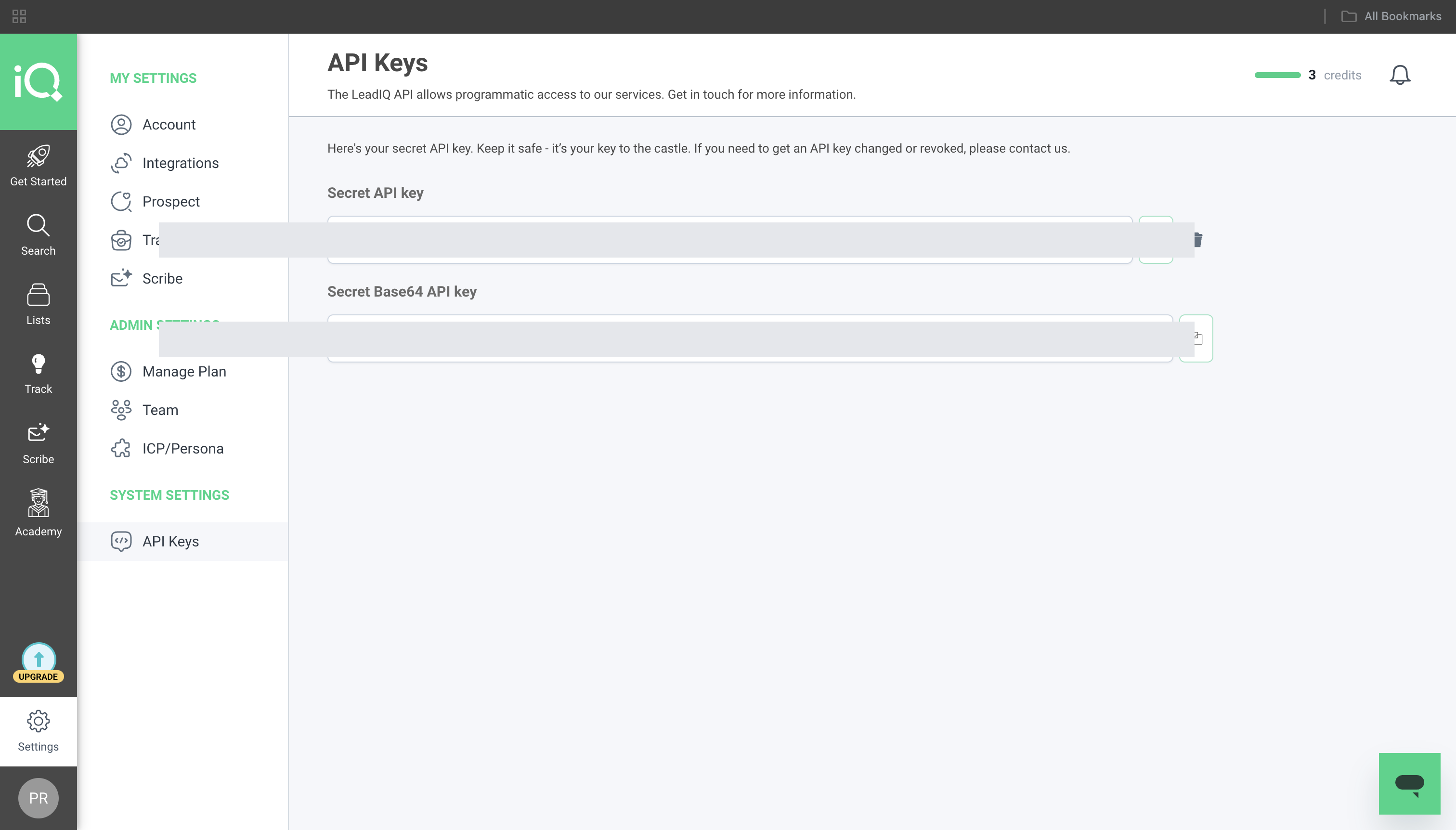
- Sign in to LeadIQ and go to Settings → API Keys.
- Copy the Secret API key value, or click Generate new API key to create one dedicated to this integration.
-
Create a connection in Scalekit
- In Scalekit dashboard, go to AgentKit → Connections → Create Connection. Find LeadIQ and click Create.
- Note the Connection name — you will use this as
connection_namein your code (e.g.,leadiq). - Click Save.
-
Add a connected account
Connected accounts link a specific user identifier in your system to their LeadIQ API key. Add them via the dashboard for testing, or via the Scalekit API in production.
Via dashboard (for testing)
- Open the connection you created and click the Connected Accounts tab → Add account.
- Fill in:
- Your User’s ID — a unique identifier for this user in your system (e.g.,
user_123) - API Key — the LeadIQ API key from step 1
- Your User’s ID — a unique identifier for this user in your system (e.g.,
- Click Create Account.
Via API (for production)
import { Scalekit } from '@scalekit-sdk/node';const scalekit = new Scalekit(process.env.SCALEKIT_ENV_URL,process.env.SCALEKIT_CLIENT_ID,process.env.SCALEKIT_CLIENT_SECRET,);// Never hard-code credentials — read from secure storage or user inputconst leadiqApiKey = getUserLeadIQApiKey(); // retrieve from your secure storeawait scalekit.actions.upsertConnectedAccount({connectionName: 'leadiq',identifier: 'user_123',credentials: {username: leadiqApiKey,},});import osfrom scalekit import ScalekitClientscalekit_client = ScalekitClient(env_url=os.environ["SCALEKIT_ENV_URL"],client_id=os.environ["SCALEKIT_CLIENT_ID"],client_secret=os.environ["SCALEKIT_CLIENT_SECRET"],)# Never hard-code credentials — read from secure storage or user inputleadiq_api_key = get_user_leadiq_api_key() # retrieve from your secure storescalekit_client.actions.upsert_connected_account(connection_name="leadiq",identifier="user_123",credentials={"username": leadiq_api_key},)
-
What you can do
Section titled “What you can do”Connect this agent connector to let your agent:
- Search contacts — look up verified work emails, direct dials, and mobile numbers by LinkedIn URL, email, or name
- Preview before consuming credits — check whether LeadIQ has a work email or phone for a person without spending credits
- Enrich companies — fetch firmographics including industry, employee count, and location by domain or name
- Advanced prospecting — filter contacts by title, seniority, industry, company size, and location; get results flat or grouped by company
- Manage prospect lists — create lists, add contacts, and retrieve saved prospects (requires Prospector plan)
- Monitor quota — check API credit usage, plan limits, and subscription status before making credit-consuming calls
Common workflows
Section titled “Common workflows”Check credit quota before searching
Always check available credits before calling tools that consume them (leadiq_search_people, leadiq_flat_advanced_search, leadiq_grouped_advanced_search).
const usage = await actions.executeTool({ toolName: 'leadiq_get_usage', connectionName: 'leadiq', identifier: 'user_123', toolInput: {},});console.log(usage.data?.usage);usage = actions.execute_tool( tool_name="leadiq_get_usage", connection_name="leadiq", identifier="user_123", tool_input={},)print(usage.data)Preview contact availability before consuming credits
Use leadiq_search_people_preview to check whether LeadIQ has a work email or phone for a person before calling leadiq_search_people. The preview call does not consume credits.
const preview = await actions.executeTool({ toolName: 'leadiq_search_people_preview', connectionName: 'leadiq', identifier: 'user_123', toolInput: { linkedin_url: 'https://www.linkedin.com/in/janedoe', },});
if (preview.data?.data?.searchPeoplePreview?.hasEmail) { // Safe to call leadiq_search_people — credits will be consumed}preview = actions.execute_tool( tool_name="leadiq_search_people_preview", connection_name="leadiq", identifier="user_123", tool_input={"linkedin_url": "https://www.linkedin.com/in/janedoe"},)
result = preview.data.get("data", {}).get("searchPeoplePreview", {})if result.get("hasEmail"): # Safe to call leadiq_search_people — credits will be consumed passLook up a contact by LinkedIn URL, email, or name
// By LinkedIn URL (most precise)const contact = await actions.executeTool({ toolName: 'leadiq_search_people', connectionName: 'leadiq', identifier: 'user_123', toolInput: { linkedin_url: 'https://www.linkedin.com/in/janedoe', limit: 1, },});
// By name + companyconst byName = await actions.executeTool({ toolName: 'leadiq_search_people', connectionName: 'leadiq', identifier: 'user_123', toolInput: { first_name: 'Jane', last_name: 'Doe', company_name: 'Acme Corp', limit: 5, },});# By LinkedIn URL (most precise)contact = actions.execute_tool( tool_name="leadiq_search_people", connection_name="leadiq", identifier="user_123", tool_input={ "linkedin_url": "https://www.linkedin.com/in/janedoe", "limit": 1, },)
# By name + companyby_name = actions.execute_tool( tool_name="leadiq_search_people", connection_name="leadiq", identifier="user_123", tool_input={ "first_name": "Jane", "last_name": "Doe", "company_name": "Acme Corp", "limit": 5, },)Enrich a company by domain or name
const company = await actions.executeTool({ toolName: 'leadiq_search_company', connectionName: 'leadiq', identifier: 'user_123', toolInput: { domain: 'acme.com', },});console.log(company.data?.data?.searchCompany);company = actions.execute_tool( tool_name="leadiq_search_company", connection_name="leadiq", identifier="user_123", tool_input={"domain": "acme.com"},)print(company.data)Advanced people search with industry and seniority filters
Pass filter objects as Python dicts or JavaScript objects — not JSON-encoded strings.
const results = await actions.executeTool({ toolName: 'leadiq_flat_advanced_search', connectionName: 'leadiq', identifier: 'user_123', toolInput: { company_filter: { industries: ['Software Development'], sizes: [{ min: 50, max: 500 }], }, contact_filter: { seniorities: ['VP', 'Director'], }, limit: 10, },});const people = results.data?.data?.flatAdvancedSearch?.people ?? [];results = actions.execute_tool( tool_name="leadiq_flat_advanced_search", connection_name="leadiq", identifier="user_123", tool_input={ "company_filter": { "industries": ["Software Development"], "sizes": [{"min": 50, "max": 500}], }, "contact_filter": { "seniorities": ["VP", "Director"], }, "limit": 10, },)people = results.data.get("data", {}).get("flatAdvancedSearch", {}).get("people", [])Advanced search grouped by company (account-based prospecting)
Returns results organized by company, each with a list of matching contacts. Useful for account-based outreach.
const grouped = await actions.executeTool({ toolName: 'leadiq_grouped_advanced_search', connectionName: 'leadiq', identifier: 'user_123', toolInput: { company_filter: { industries: ['Financial Services'], sizes: [{ min: 200, max: 5000 }], }, contact_filter: { seniorities: ['Executive', 'VP'], }, limit: 5, // number of companies limit_per_company: 3, // contacts per company },});const companies = grouped.data?.data?.groupedAdvancedSearch?.companies ?? [];grouped = actions.execute_tool( tool_name="leadiq_grouped_advanced_search", connection_name="leadiq", identifier="user_123", tool_input={ "company_filter": { "industries": ["Financial Services"], "sizes": [{"min": 200, "max": 5000}], }, "contact_filter": { "seniorities": ["Executive", "VP"], }, "limit": 5, # number of companies "limit_per_company": 3, # contacts per company },)companies = ( grouped.data.get("data", {}) .get("groupedAdvancedSearch", {}) .get("companies", []))Report incorrect contact data
Help improve LeadIQ data quality by reporting bounced emails or wrong phone numbers.
await actions.executeTool({ toolName: 'leadiq_submit_person_feedback', connectionName: 'leadiq', identifier: 'user_123', toolInput: { value: 'jane.doe@acme.com', status: 'Invalid', type: 'WorkEmail', invalid_reason: 'EmailBounceCode550', },});actions.execute_tool( tool_name="leadiq_submit_person_feedback", connection_name="leadiq", identifier="user_123", tool_input={ "value": "jane.doe@acme.com", "status": "Invalid", "type": "WorkEmail", "invalid_reason": "EmailBounceCode550", },)Tool list
Section titled “Tool list”Use the exact tool names from the Tool list below when you call execute_tool. If you’re not sure which name to use, list the tools available for the current user first.
leadiq_add_prospect_to_list#Add a contact to an existing LeadIQ prospect list. Provide first name, last name, and any known contact details. Use Get Prospect Lists to find the list ID.13 params
Add a contact to an existing LeadIQ prospect list. Provide first name, last name, and any known contact details. Use Get Prospect Lists to find the list ID.
first_namestringrequiredFirst name of the prospectlast_namestringrequiredLast name of the prospectlist_idstringrequiredID of the prospect list to add the contact tocompanystringoptionalCurrent company name of the prospectcompany_domainstringoptionalWebsite domain of the prospect's companycompany_industrystringoptionalIndustry of the prospect's companylinkedin_urlstringoptionalLinkedIn profile URL of the prospectmobile_phonestringoptionalMobile phone number of the prospectnotesstringoptionalInternal notes about this prospectsenioritystringoptionalSeniority level of the prospecttitlestringoptionalJob title of the prospectwork_emailstringoptionalWork email address of the prospectwork_phonestringoptionalWork phone number of the prospectleadiq_create_list#Create a new prospect list in LeadIQ to organize contacts for outreach campaigns. Returns the created list ID for use with Add Prospect to List.2 params
Create a new prospect list in LeadIQ to organize contacts for outreach campaigns. Returns the created list ID for use with Add Prospect to List.
namestringrequiredName of the prospect listdescriptionstringoptionalOptional description of the prospect listleadiq_flat_advanced_search#Search across LeadIQ's full contact database using advanced filters for title, seniority, company, industry, location, and more. Returns a flat list of matching contacts. Consumes credits per result.6 params
Search across LeadIQ's full contact database using advanced filters for title, seniority, company, industry, location, and more. Returns a flat list of matching contacts. Consumes credits per result.
company_excluded_filterobjectoptionalExclude contacts at companies matching these criteriacompany_filterobjectoptionalFilter by company attributes including name, domain, industry, size, and locationcontact_excluded_filterobjectoptionalExclude contacts matching these criteriacontact_filterobjectoptionalFilter contacts by title, seniority, role, location, and morelimitintegeroptionalMaximum number of contacts to return (default 10)skipintegeroptionalNumber of results to skip for pagination (default 0)leadiq_get_account#Retrieve the current LeadIQ account details including active plans, product subscriptions, billing status, and credit usage (available and used). Use this to check remaining search credits before making enrichment calls.0 params
Retrieve the current LeadIQ account details including active plans, product subscriptions, billing status, and credit usage (available and used). Use this to check remaining search credits before making enrichment calls.
leadiq_get_company#Retrieve a single company record by its LeadIQ company ID, returning full firmographic details: industry, employee count, headquarters location, funding, and known email domains. Use Search Company, or the company objects embedded in People Search / Advanced Search results, to find a company ID first.1 param
Retrieve a single company record by its LeadIQ company ID, returning full firmographic details: industry, employee count, headquarters location, funding, and known email domains. Use Search Company, or the company objects embedded in People Search / Advanced Search results, to find a company ID first.
idstringrequiredLeadIQ company ID to retrieveleadiq_get_list#Retrieve a specific prospect list by ID, including its contacts with name, title, company, email, and LinkedIn URL. Use Get Prospect Lists first to find the list ID.3 params
Retrieve a specific prospect list by ID, including its contacts with name, title, company, email, and LinkedIn URL. Use Get Prospect Lists first to find the list ID.
idstringrequiredID of the prospect list to retrieveprospects_cursorstringoptionalPagination cursor from a previous response to get the next batch of prospectsprospects_limitintegeroptionalMaximum number of prospects to return from the list (default 25)leadiq_get_lists#Retrieve all prospect lists in the LeadIQ account. Returns list metadata including name, status, and timestamps. Use the returned list IDs with Get Prospect List to fetch contacts.2 params
Retrieve all prospect lists in the LeadIQ account. Returns list metadata including name, status, and timestamps. Use the returned list IDs with Get Prospect List to fetch contacts.
cursorstringoptionalPagination cursor from a previous response's nextCursor fieldlimitintegeroptionalMaximum number of lists to return per pageleadiq_get_prospect#Retrieve a single prospect record by ID, including full contact details: emails, phones, LinkedIn, title, company, and location.1 param
Retrieve a single prospect record by ID, including full contact details: emails, phones, LinkedIn, title, company, and location.
idstringrequiredID of the prospect to retrieveleadiq_get_usage#Retrieve API credit usage for the current billing period — plan credit counts, usage caps, trial usage, and subscription status. Use this to monitor quota before making credit-consuming calls.0 params
Retrieve API credit usage for the current billing period — plan credit counts, usage caps, trial usage, and subscription status. Use this to monitor quota before making credit-consuming calls.
leadiq_grouped_advanced_search#Search LeadIQ's contact database with advanced filters and get results grouped by company. Each result contains a company record with its top matching contacts. Useful for account-based prospecting. Consumes credits per contact returned.7 params
Search LeadIQ's contact database with advanced filters and get results grouped by company. Each result contains a company record with its top matching contacts. Useful for account-based prospecting. Consumes credits per contact returned.
company_excluded_filterobjectoptionalExclude companies matching these criteriacompany_filterobjectoptionalFilter by company name, domain, industry, size, location, and morecontact_excluded_filterobjectoptionalExclude contacts matching these criteriacontact_filterobjectoptionalFilter contacts by title, seniority, role, location, and morelimitintegeroptionalMaximum number of companies to return (default 10)limit_per_companyintegeroptionalMaximum number of contacts to return per company (default 5)skipintegeroptionalNumber of companies to skip for pagination (default 0)leadiq_search_company#Search for a company by name, domain, or LinkedIn URL. Returns firmographic data including employee count, industry, headquarters location, and funding information.5 params
Search for a company by name, domain, or LinkedIn URL. Returns firmographic data including employee count, industry, headquarters location, and funding information.
domainstringoptionalCompany website domainlinkedin_idstringoptionalLinkedIn company numeric IDlinkedin_urlstringoptionalLinkedIn company page URLnamestringoptionalCompany name to search forstrictbooleanoptionalEnable strict matching — only return exact name or domain matchesleadiq_search_people#Search for a person by LinkedIn URL, email, or name + company. At least one of: linkedin_url, email, or first_name+last_name must be provided. Returns verified work emails, direct dials, and current job details. Consumes LeadIQ credits per result.10 params
Search for a person by LinkedIn URL, email, or name + company. At least one of: linkedin_url, email, or first_name+last_name must be provided. Returns verified work emails, direct dials, and current job details. Consumes LeadIQ credits per result.
company_domainstringoptionalDomain of the person's current companycompany_namestringoptionalCurrent company name of the personcontains_work_contact_infobooleanoptionalOnly return results that have at least one work email or work phoneemailstringoptionalKnown email address of the personfirst_namestringoptionalFirst name of the person to search forfull_namestringoptionalFull name of the person (alternative to first_name + last_name)last_namestringoptionalLast name of the person to search forlimitintegeroptionalMaximum number of results to return (default 10, max 25)linkedin_urlstringoptionalLinkedIn profile URL of the personskipintegeroptionalNumber of results to skip for pagination (default 0)leadiq_search_people_preview#Check whether LeadIQ has a work email or phone number for a person without consuming credits. Use this before calling Search People to avoid wasting credits on contacts with no data.7 params
Check whether LeadIQ has a work email or phone number for a person without consuming credits. Use this before calling Search People to avoid wasting credits on contacts with no data.
company_domainstringoptionalDomain of the person's current companycompany_namestringoptionalCurrent company name of the personemailstringoptionalKnown email address of the personfirst_namestringoptionalFirst name of the personfull_namestringoptionalFull name of the personlast_namestringoptionalLast name of the personlinkedin_urlstringoptionalLinkedIn profile URL of the personleadiq_submit_person_feedback#Report incorrect or outdated contact data back to LeadIQ to improve data quality. Mark an email or phone as correct or invalid, and optionally provide a correction or bounce reason.9 params
Report incorrect or outdated contact data back to LeadIQ to improve data quality. Mark an email or phone as correct or invalid, and optionally provide a correction or bounce reason.
valuestringrequiredThe contact info value being reported (email address or phone number)company_domainstringoptionalCompany domain for additional contextcompany_namestringoptionalCompany name for additional contextinvalid_reasonstringoptionalSpecific bounce or invalidity reason code (for invalid emails)linkedin_urlstringoptionalLinkedIn URL of the person the feedback is aboutperson_idstringoptionalLeadIQ person ID associated with the contact infostatusstringoptionalWhether the contact info is correct or invalidtitlestringoptionalJob title of the person at the time the contact info was usedtypestringoptionalType of contact information being reported