


Trello
scalekit36 toolsOAuth 1.0aProject ManagementCollaborationProductivityConnect to Trello. Manage boards, cards, lists, and team collaboration workflows
Trello connector
-
Install the SDK
Section titled “Install the SDK”Terminal window npm install @scalekit-sdk/nodeTerminal window pip install scalekit -
Set your credentials
Section titled “Set your credentials”Add your Scalekit credentials to your
.envfile. Find values in app.scalekit.com > Developers > API Credentials..env SCALEKIT_ENVIRONMENT_URL=<your-environment-url>SCALEKIT_CLIENT_ID=<your-client-id>SCALEKIT_CLIENT_SECRET=<your-client-secret> -
Set up the connector
Section titled “Set up the connector”Register your Trello credentials with Scalekit so it handles the token lifecycle. You do this once per environment.
Dashboard setup steps
Register your Trello API key and application name with Scalekit so it can authenticate and manage the OAuth 1.0a flow on your behalf.
-
Copy the redirect URI from Scalekit
-
In the Scalekit dashboard, go to AgentKit > Connections > Create Connection. Find Trello and click Create.
-
Click Use your own credentials and copy the redirect URI. It looks like
https://<SCALEKIT_ENVIRONMENT_URL>/sso/v1/oauth/<CONNECTION_ID>/callback.
-
-
Create a Power-Up app in Trello
-
Sign in to trello.com/power-ups/admin and click New to create an app (or open an existing one, for example
Agent Auth).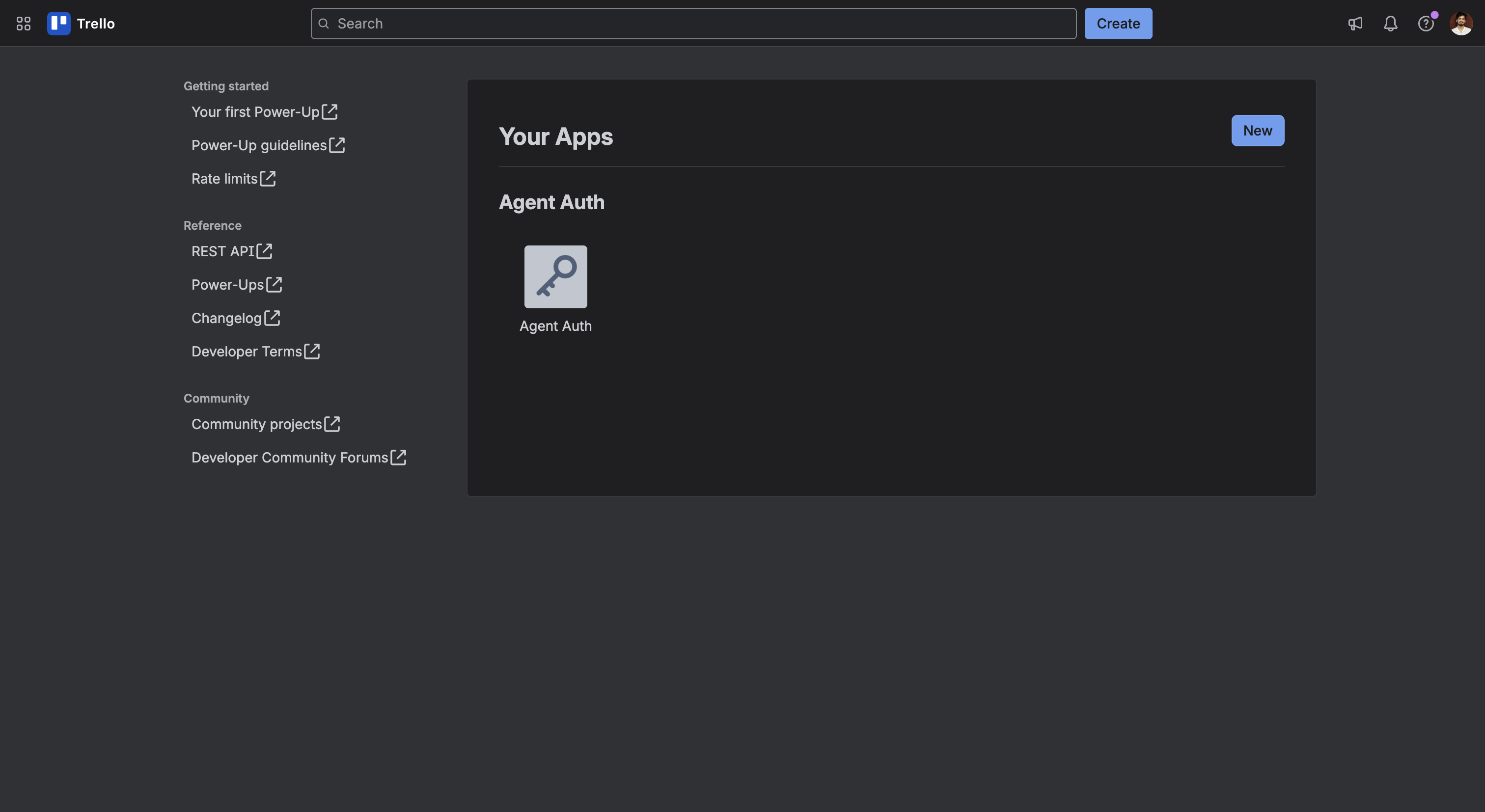
-
-
Add the redirect URI and copy your API Key
-
Open the app and go to the API key tab.
-
Under Allowed origins, paste the redirect URI you copied from Scalekit and click Add.
-
Copy the API key value — you’ll use this as the
client_idin Scalekit.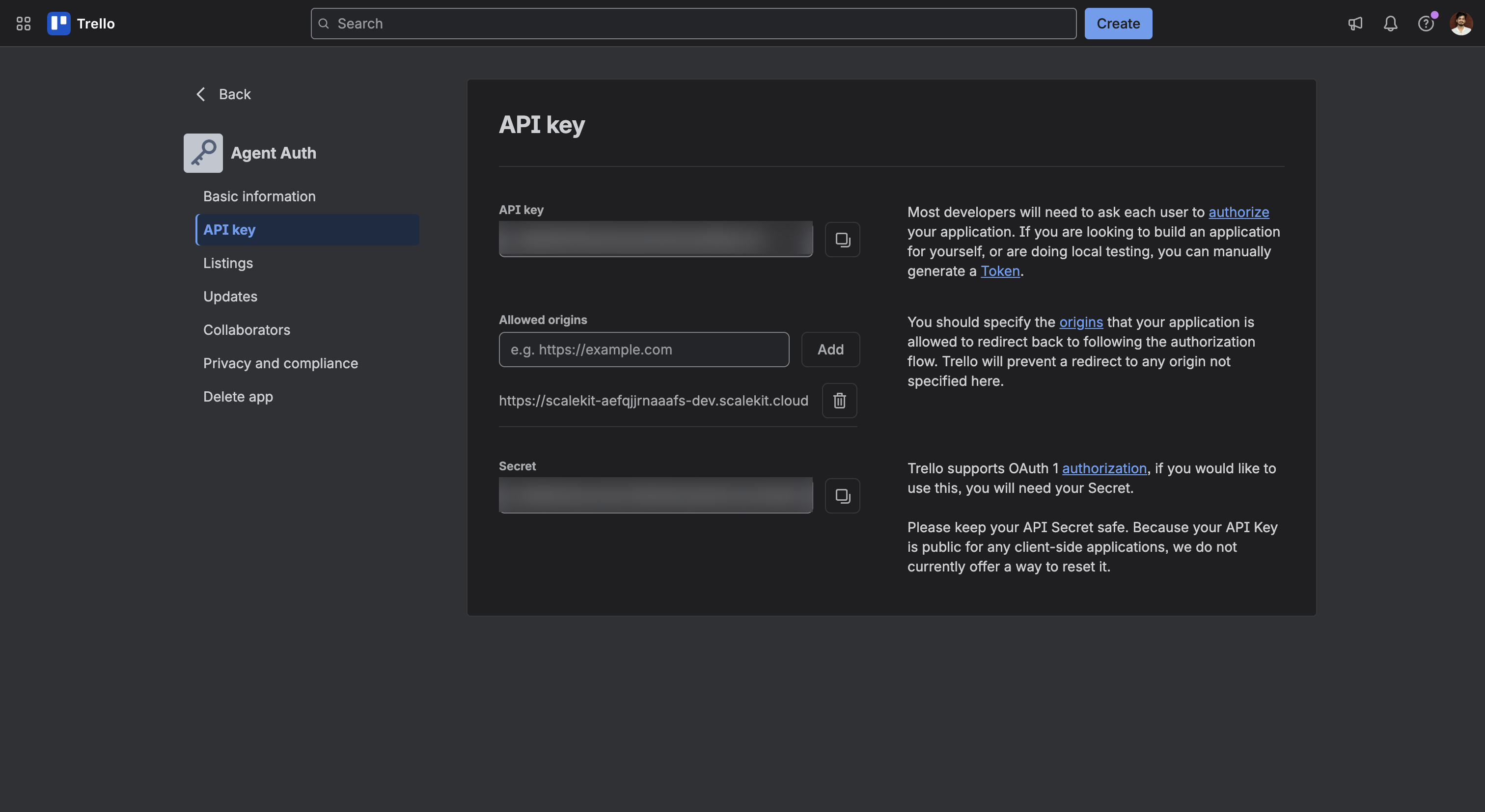
-
-
Add credentials in Scalekit
- Return to the connection you created in Scalekit and enter:
- API Key — the API key you copied from Trello (used as
client_id) - Application Name — the name shown to users on Trello’s authorization page (for example,
Agent Auth)
- API Key — the API key you copied from Trello (used as
- Click Save.
- Return to the connection you created in Scalekit and enter:
-
What you can do
Section titled “What you can do”Connect this agent connector to let your agent:
- Update list, label, checklist item — Rename, reposition, or archive/unarchive a Trello list
- Search records — Global keyword search across Trello boards, cards, members, and organizations that the authenticated user can access
- Card remove member from, remove label from, add member to — Remove a member from a Trello card
- List my boards — List the boards the authenticated user belongs to
- Get webhook, current member, checklist — Get a Trello webhook’s current details and status by ID
- Delete webhook, label, comment — Permanently delete a Trello webhook by its ID, stopping any further callbacks
Common workflows
Section titled “Common workflows”Proxy API call
const result = await actions.request({ connectionName: 'trello', identifier: 'user_123', path: '/1/members/me', method: 'GET',});console.log(result);result = actions.request( connection_name='trello', identifier='user_123', path="/1/members/me", method="GET")print(result)Execute a tool
const result = await actions.executeTool({ connector: 'trello', identifier: 'user_123', toolName: 'trello_list', toolInput: {},});console.log(result);result = actions.execute_tool( tool_input={}, tool_name='trello_list', connection_name='trello', identifier='user_123',)print(result)Tool list
Section titled “Tool list”Use the exact tool names from the Tool list below when you call execute_tool. If you’re not sure which name to use, list the tools available for the current user first.
trello_add_attachment_to_card#Attach a URL to a Trello card. Trello fetches the URL and shows a preview when it recognizes the link type (e.g. images, YouTube, Google Drive).3 params
Attach a URL to a Trello card. Trello fetches the URL and shows a preview when it recognizes the link type (e.g. images, YouTube, Google Drive).
idstringrequiredThe ID of the card to attach the URL tourlstringrequiredURL of the attachmentnamestringoptionalDisplay name for the attachmenttrello_add_checklist_item#Add a new item to a Trello checklist.4 params
Add a new item to a Trello checklist.
idstringrequiredThe ID of the checklist to add the item tonamestringrequiredText of the checklist itemcheckedbooleanoptionalWhether the item starts checked offposstringoptionalPosition of the item in the checklist: top, bottom, or a positive numbertrello_add_comment_to_card#Add a comment to a Trello card.2 params
Add a comment to a Trello card.
idstringrequiredThe ID of the card to comment ontextstringrequiredThe comment texttrello_add_label_to_card#Apply an existing board label to a Trello card. Use Get Board Labels or Create Label to find or create a label ID first.2 params
Apply an existing board label to a Trello card. Use Get Board Labels or Create Label to find or create a label ID first.
idstringrequiredThe ID of the card to labelidLabelstringrequiredThe ID of the label to addtrello_add_member_to_card#Assign a member to a Trello card.2 params
Assign a member to a Trello card.
idstringrequiredThe ID of the card to assign the member toidMemberstringrequiredThe ID of the member to addtrello_create_board#Create a new Trello board.4 params
Create a new Trello board.
namestringrequiredName of the boarddefaultListsbooleanoptionalWhether to seed the board with the default To Do / Doing / Done listsdescstringoptionalDescription of the boardidOrganizationstringoptionalID of the Workspace (organization) to create the board intrello_create_card#Create a new card on a Trello list.7 params
Create a new card on a Trello list.
idListstringrequiredThe ID of the list to create the card indescstringoptionalDescription of the cardduestringoptionalDue date for the card, ISO 8601 formatidLabelsstringoptionalComma-separated list of label IDs to apply to the cardidMembersstringoptionalComma-separated list of member IDs to assign to the cardnamestringoptionalName (title) of the cardposstringoptionalPosition of the card in the list: top, bottom, or a positive numbertrello_create_checklist#Create a new checklist on a Trello card.3 params
Create a new checklist on a Trello card.
idCardstringrequiredThe ID of the card to add the checklist tonamestringrequiredName of the checklistposstringoptionalPosition of the checklist on the card: top, bottom, or a positive numbertrello_create_label#Create a new label on a Trello board. Use Add Label To Card afterward to apply it.3 params
Create a new label on a Trello board. Use Add Label To Card afterward to apply it.
colorstringrequiredColor of the labelidBoardstringrequiredThe ID of the board to create the label onnamestringrequiredName of the labeltrello_create_list#Create a new list on a Trello board.3 params
Create a new list on a Trello board.
idBoardstringrequiredThe ID of the board to create the list onnamestringrequiredName of the listposstringoptionalPosition of the list on the board: top, bottom, or a positive numbertrello_create_webhook#Create a webhook that notifies a callback URL whenever a Trello board, card, list, or other model changes.4 params
Create a webhook that notifies a callback URL whenever a Trello board, card, list, or other model changes.
callbackURLstringrequiredThe publicly reachable URL Trello will POST updates toidModelstringrequiredThe ID of the board, card, list, or other model to watchactivebooleanoptionalWhether the webhook is active immediatelydescriptionstringoptionalDescription of the webhooktrello_delete_attachment#Permanently delete an attachment from a Trello card. Complements Add Attachment To Card.2 params
Permanently delete an attachment from a Trello card. Complements Add Attachment To Card.
idstringrequiredThe ID of the card the attachment belongs toidAttachmentstringrequiredThe ID of the attachment to deletetrello_delete_card#Permanently delete a Trello card. This cannot be undone — to keep the card but hide it, use Update Card with closed=true instead.1 param
Permanently delete a Trello card. This cannot be undone — to keep the card but hide it, use Update Card with closed=true instead.
idstringrequiredThe ID of the card to deletetrello_delete_checklist#Permanently delete a Trello checklist. Complements Create Checklist.1 param
Permanently delete a Trello checklist. Complements Create Checklist.
idstringrequiredThe ID of the checklist to deletetrello_delete_checklist_item#Remove a single item from a Trello checklist. Complements Add Checklist Item.2 params
Remove a single item from a Trello checklist. Complements Add Checklist Item.
idstringrequiredThe ID of the checklist the item belongs toidCheckItemstringrequiredThe ID of the checklist item to removetrello_delete_comment#Delete a comment from a Trello card. Comments are represented as actions of type commentCard; pass that action's ID. Complements Add Comment To Card.2 params
Delete a comment from a Trello card. Comments are represented as actions of type commentCard; pass that action's ID. Complements Add Comment To Card.
idstringrequiredThe ID of the card the comment belongs toidActionstringrequiredThe ID of the comment action to deletetrello_delete_label#Permanently delete a Trello label from a board. This removes it from every card that uses it and cannot be undone.1 param
Permanently delete a Trello label from a board. This removes it from every card that uses it and cannot be undone.
idstringrequiredThe ID of the label to deletetrello_delete_webhook#Permanently delete a Trello webhook by its ID, stopping any further callbacks.1 param
Permanently delete a Trello webhook by its ID, stopping any further callbacks.
idstringrequiredThe ID of the webhook to deletetrello_get_board#Get a Trello board by its ID, including optional fields, cards, lists, and members.5 params
Get a Trello board by its ID, including optional fields, cards, lists, and members.
idstringrequiredThe ID of the board to retrievecardsstringoptionalWhich cards to returnfieldsstringoptionalComma-separated list of board fields to returnlistsstringoptionalWhich lists to returnmembersstringoptionalWhich members to returntrello_get_board_actions#Get the activity log (actions) for a Trello board.4 params
Get the activity log (actions) for a Trello board.
idstringrequiredThe ID of the boardfilterstringoptionalComma-separated list of action types to filter bylimitintegeroptionalMaximum number of actions to returnpageintegeroptionalPage number for paginationtrello_get_board_cards#Get all cards on a Trello board, optionally filtered by status.3 params
Get all cards on a Trello board, optionally filtered by status.
idstringrequiredThe ID of the boardfieldsstringoptionalComma-separated list of card fields to returnfilterstringoptionalFilter cards by statustrello_get_board_labels#Get all labels defined on a Trello board.3 params
Get all labels defined on a Trello board.
idstringrequiredThe ID of the boardfieldsstringoptionalComma-separated list of label fields to returnlimitintegeroptionalMaximum number of labels to return (0–1000)trello_get_board_lists#Get all lists on a Trello board, optionally filtered by status.2 params
Get all lists on a Trello board, optionally filtered by status.
idstringrequiredThe ID of the boardfilterstringoptionalFilter lists by statustrello_get_board_members#Get all members of a Trello board, optionally filtered by role.2 params
Get all members of a Trello board, optionally filtered by role.
idstringrequiredThe ID of the boardfilterstringoptionalFilter members by roletrello_get_card#Get a Trello card by its ID.2 params
Get a Trello card by its ID.
idstringrequiredThe ID of the card to retrievefieldsstringoptionalComma-separated list of card fields to returntrello_get_checklist#Get a Trello checklist by its ID, including its check items.3 params
Get a Trello checklist by its ID, including its check items.
idstringrequiredThe ID of the checklist to retrievecheckItemsstringoptionalWhether to include check items in the responsefieldsstringoptionalComma-separated list of checklist fields to returntrello_get_current_member#Get the authenticated user's own Trello member info (profile, username, boards/organizations membership summary).1 param
Get the authenticated user's own Trello member info (profile, username, boards/organizations membership summary).
fieldsstringoptionalComma-separated list of member fields to returntrello_get_webhook#Get a Trello webhook's current details and status by ID. Complements Create Webhook and Delete Webhook.1 param
Get a Trello webhook's current details and status by ID. Complements Create Webhook and Delete Webhook.
idstringrequiredThe ID of the webhook to retrievetrello_list_my_boards#List the boards the authenticated user belongs to. Use this to discover board IDs before calling other board, card, or list tools.2 params
List the boards the authenticated user belongs to. Use this to discover board IDs before calling other board, card, or list tools.
fieldsstringoptionalComma-separated list of board fields to returnfilterstringoptionalWhich boards to returntrello_remove_label_from_card#Remove a label from a Trello card. Complements Add Label To Card.2 params
Remove a label from a Trello card. Complements Add Label To Card.
idstringrequiredThe ID of the card to remove the label fromidLabelstringrequiredThe ID of the label to removetrello_remove_member_from_card#Remove a member from a Trello card. Complements Add Member To Card.2 params
Remove a member from a Trello card. Complements Add Member To Card.
idstringrequiredThe ID of the card to remove the member fromidMemberstringrequiredThe ID of the member to removetrello_search#Global keyword search across Trello boards, cards, members, and organizations that the authenticated user can access.9 params
Global keyword search across Trello boards, cards, members, and organizations that the authenticated user can access.
querystringrequiredThe search query textboards_limitintegeroptionalMaximum number of boards to return (max 1000)card_fieldsstringoptionalComma-separated list of card fields to returncards_limitintegeroptionalMaximum number of cards to return (max 1000)idBoardsstringoptionalRestrict search to specific board IDsidCardsstringoptionalRestrict search to specific card IDsidOrganizationsstringoptionalRestrict search to specific Workspace (organization) IDsmodelTypesstringoptionalWhich model types to include in resultspartialbooleanoptionalWhether to also match partial wordstrello_update_card#Update a Trello card's name, description, due date, list, position, or archived state.7 params
Update a Trello card's name, description, due date, list, position, or archived state.
idstringrequiredThe ID of the card to updateclosedbooleanoptionalArchive (true) or unarchive (false) the carddescstringoptionalNew description for the cardduestringoptionalNew due date, ISO 8601 format. Pass an empty string to clear it.idListstringoptionalID of the list to move the card tonamestringoptionalNew name (title) for the cardposstringoptionalNew position: top, bottom, or a positive numbertrello_update_checklist_item#Update a checklist item's text or checked state. Trello scopes this update by both the card and the check item ID.4 params
Update a checklist item's text or checked state. Trello scopes this update by both the card and the check item ID.
idCardstringrequiredThe ID of the card that owns the checklistidCheckItemstringrequiredThe ID of the checklist item to updatenamestringoptionalNew text for the checklist itemstatestringoptionalChecked state of the itemtrello_update_label#Rename or recolor an existing Trello label.3 params
Rename or recolor an existing Trello label.
idstringrequiredThe ID of the label to updatecolorstringoptionalNew color for the labelnamestringoptionalNew name for the labeltrello_update_list#Rename, reposition, or archive/unarchive a Trello list. Trello has no permanent list deletion — archiving (closed=true) is the standard way to remove a list from view.4 params
Rename, reposition, or archive/unarchive a Trello list. Trello has no permanent list deletion — archiving (closed=true) is the standard way to remove a list from view.
idstringrequiredThe ID of the list to updateclosedbooleanoptionalArchive (true) or unarchive (false) the listnamestringoptionalNew name for the listposstringoptionalNew position: top, bottom, or a positive number